
AI Meeting Note-Takers: Consent, Storage, and Access Checklist
Quick governance summary: Default settings on many AI meeting assistants prioritize viral growth over privacy—auto-joining every calendar invite, emailing full transcripts to external guests automatically, and retaining raw video/audio indefinitely. Before enabling any AI note-taker on work calls, enforce three defaults: auto-join OFF, host-only recap sharing initially, and explicit verbal + calendar notice plus legal consent review for your jurisdictions.
An AI note-taker that quietly emails internal debrief transcripts to external prospects—or joins an HR termination call uninvited—creates trust damage no saved typing minutes can repay.
The Real Problem: ‘Harmless Summary Bots’ With Overbroad Calendar Defaults
Unlike tools you consciously open tab by tab, AI meeting note-takers hook directly into Google Calendar or Microsoft 365 and join calls autonomously. Common failures show up fast in small teams: a bot stays behind in the waiting room after the host drops, joins a private candidate debrief, auto-shares a transcript containing side comments to every attendee on the calendar invite, or accumulates gigabytes of unreviewed voice recordings without retention expiry.
This sits squarely at the intersection of privacy compliance and everyday etiquette. While our guides on reading vendor privacy policies and auditing SaaS security pages show how to vet vendor docs, meeting assistants require distinct pre-call, in-call, and post-call permissions.
Why Consent & Storage Vary Sharply Across Jurisdictions (Do Not Guess One Universal Rule)
Recording consent laws are not uniform globally—nor even across neighboring states or regions. Depending on where your company and every call participant sit geographically, legal standards differ substantially:
- One-party vs. all-party consent rules (e.g., U.S. states): Some U.S. jurisdictions require consent from at least one party, while all-party consent states require clear notice and consent from every participant before audio/electronic recording begins.
- EU / UK GDPR transparency & lawful basis: Recording and AI transcription of identifiable voices involves personal data processing requiring an appropriate lawful basis, transparent notice before capture, data minimization, and clear rights handling (deletion, objection).
- Industry / client NDA restrictions: Regulated healthcare, legal privilege, M&A/financial advisory, or enterprise vendor NDAs often prohibit third-party cloud recording bots outright—even where local statutory law permits general recording.
Operational rule of thumb: Never optimize to the loosest threshold. Standardize your team workflow on transparent advance notice + affirmative participant agreement (or non-bot manual notes whenever anyone opts out), and verify jurisdiction-specific legal requirements with qualified counsel.
Three-Stage Meeting Bot Risk & Configuration Matrix
| Stage | Risky Default Behavior | Safer Policy Configuration |
|---|---|---|
| Pre-Call (Calendar & Invites) | Auto-join ALL calendar events (including external calls, 1:1s, and private holds). | Set auto-join OFF; require manual click-to-join per meeting; include disclosure line in invite description. |
| In-Call (Joining & Recording) | Bot records audio/video automatically before participants approve or while host steps away. | Wait for host admission; ask verbally at minute zero; dismiss immediately if any guest objects. |
| Post-Call (Storage & Sharing) | Full transcript/summary emailed automatically to all calendar invitees + open public share links. | Host-only private default; disable public ‘anyone with link’ URLs; enable 7–30 day raw audio auto-delete. |
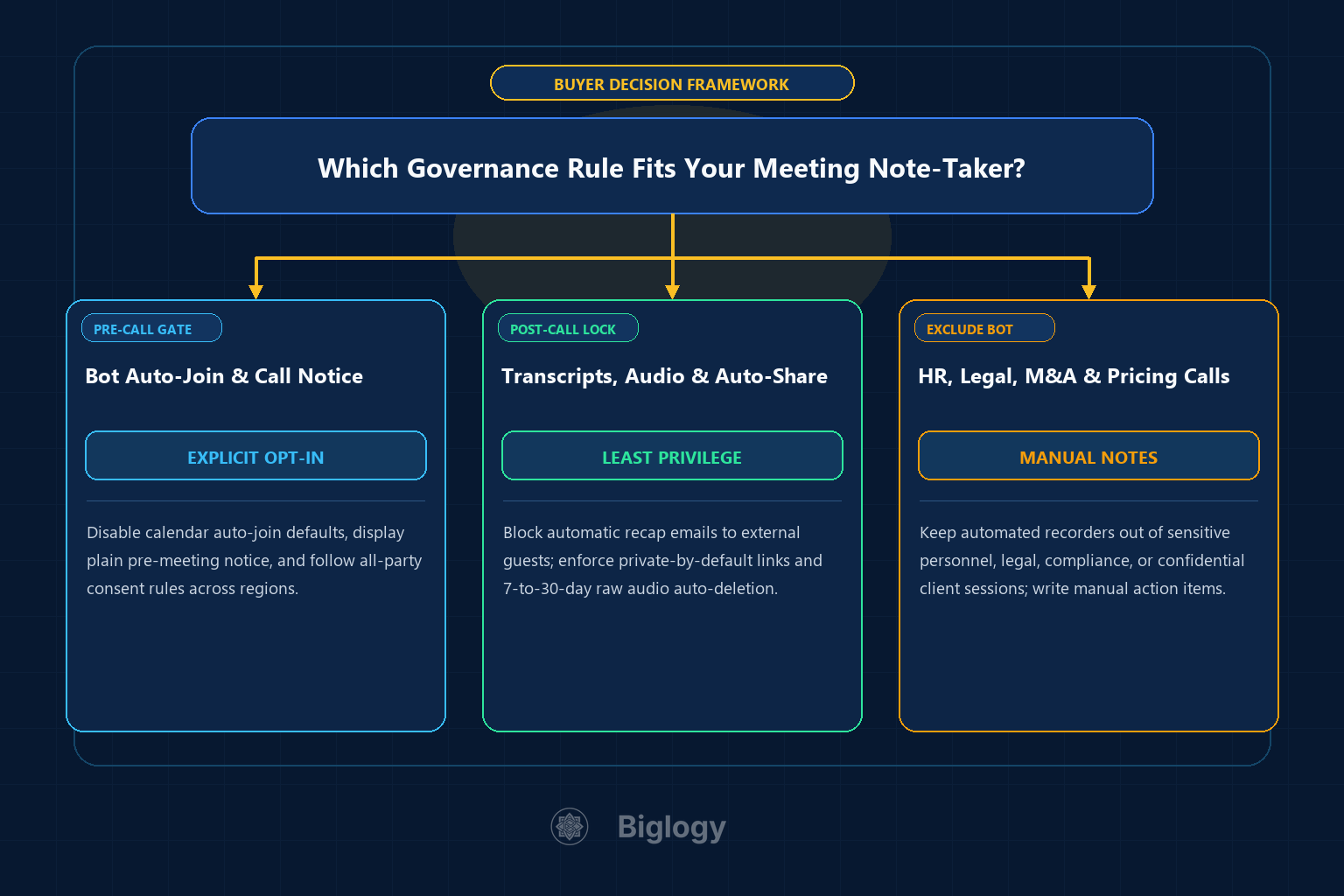
Governance Flow: When Bots Join vs. When to Keep Notes Human
Use this three-lane decision split to separate routine project syncs from meetings where bots should remain disabled entirely.
No-Tool First Step: The Manual Action-Item Habit That Replaces 70% of Recordings
Before paying for per-seat meeting note bots across your whole staff, ask whether full verbatim voice transcripts are actually what teams read afterward. In practice, attendees rarely replay 45-minute call recordings—they only want decisions, owners, and deadlines. Two tool-free practices often beat bots completely:
- Assign a rotating 3-line Scribe Block in your existing agenda doc: Spend the last 3 minutes of any call reading aloud Decisions Made | Action Item + Owner + Due Date | Open Questions right inside the shared doc while everyone nods yes.
- Use built-in workspace privacy-controlled captions or manual summary prompts ONLY when truly helpful: When a call genuinely needs complex discovery detail (such as a scoped technical kickoff), verify consent openly rather than running stealth recorders on routine check-ins.
Copyable AI Meeting Bot Governance Checklist & Invite Notice
AI MEETING NOTE-TAKER PRE-FLIGHT CHECKLIST
===========================================
ADMIN SETTINGS (VERIFY BEFORE ROLLING OUT):
[ ] 1. AUTO-JOIN: Disabled globally; bots only enter when manually triggered for an approved call.
[ ] 2. AUTO-SHARE EMAIL: OFF for external participants; prevent accidental automatic recap blasts.
[ ] 3. LINK ACCESS: Locked to workspace participants ONLY (zero unauthenticated public web URLs).
[ ] 4. AUDIO / VIDEO RETENTION: Confirm raw recordings auto-purge on a tight schedule (or transcript-only mode).
[ ] 5. AI TRAINING OPT-OUT & DPA: Confirmed workspace inputs are excluded from base model training under vendor terms.

CALL EXCLUSION LIST (BOT MUST STAY OFF):
- HR interviews, performance reviews, compensation, & disciplinary discussions
- Legal counsel, contract negotiation redlines, pricing strategy, & M&A talks
- Regulated healthcare / financial personal data & client NDAs banning 3rd-party processors

SHORT CALENDAR INVITE NOTICE TEMPLATE:
"Notice: For accurate action items, we only use [Tool Name] if all attendees agree at the start of the call. Let us know anytime—before or during the call—if you prefer standard manual notes only."
Seven-Day Configuration Verification
- Log into every existing note-taker seat across the team today (remember individual trial sign-ups often connect invisibly via Google/Microsoft OAuth!).
- Check connected calendar rules, revoke any shadow OAuth tokens for unapproved note-taker apps inside Google Account Security / Entra ID, and switch remaining approved accounts to Manual Trigger + Host-Only Sharing.
- Run one internal test meeting: confirm the bot announces itself properly, stays private by default after call end, and deletes test audio cleanly when deleted.
Frequently Asked Questions
If a calendar invite mentions an AI note-taker, is that enough consent everywhere?
Not necessarily. Passive calendar wording can be overlooked by external guests who join via a forwarded link or dial in by phone. Combining advance invite notice with a plain verbal check at the start of the call—plus clear legal review for your operating jurisdictions—is much safer than assuming silent consent.
Do AI meeting tools store data even if we only want bulleted action items?
Typically yes, at least during processing—and many default to keeping raw audio/video files alongside searchable transcripts unless you configure auto-deletion or transcript-only retention limits.
How do silent ‘shadow note-takers’ show up if nobody remembers installing them?
Usually a single employee trialed a free browser extension or granted OAuth calendar access once, leaving an active recurring rule that sends a branded bot to join future team calls.
Should external prospect discovery calls allow AI bots?
Ask explicitly at the start and respect immediate refusal without pushback. In competitive or legal-sensitive B2B deals, turning bots off often builds noticeably stronger candor and trust.
What about built-in platform tools vs. third-party meeting bots?
Native enterprise host suites (controlled under existing company workspace agreements) avoid adding an extra subprocessor and extra calendar OAuth bridge—though consent, recording notice, link access, and retention rules still need explicit setup either way.
Editorial transparency: This operational governance checklist is non-commercial educational guidance and is not legal advice. Consult legal counsel for binding compliance interpretation in your jurisdictions. Read Biglogy’s principles in our Publishing Charter.


Leave a Reply
Want to join the discussion?Feel free to contribute!