

When No Tool Is Needed: Deciding Between SaaS, Spreadsheets, and Manual Process
Quick decision rule: Never purchase a dedicated SaaS subscription simply because a workflow exists. If your team processes fewer than 150 rows per month, works with fewer than three concurrent editors, or maintains a process that changes quarterly, a structured Google Sheet or Airtable base with basic form triggers beats specialized software on speed, total cost, and flexibility.
The fastest way to drain operational budget is buying a recurring subscription for an unproven workflow. Spreadsheets fail only when concurrent access locks, complex permissions, or scale demand a true relational database.
The Software Bloat Trap: Paying Monthly Rents for Empty Dashboards
Software vendors excel at framing simple organizational tasks as emergencies requiring a $49/user/month seat. A small agency signs up for a dedicated client onboarding suite, a boutique creator buys an enterprise community CRM, and an ecommerce store pays for an inventory tracker that three team members abandon within thirty days. As detailed in Biglogy’s SaaS subscription audit checklist, modern teams frequently pay for five to eight overlapping point solutions where shared documents would run circles around them.
Premature software adoption creates two hidden taxes: the direct credit card charge and the ongoing configuration overhead. Before evaluating pricing tiers, test whether your workflow clears the threshold where software genuinely saves more hours than it demands in maintenance.
The 5-Point DIY vs. SaaS Break-Even Formula
| Evaluation Criteria | Keep in Spreadsheets / Manual | Upgrade to Dedicated SaaS |
|---|---|---|
| 1. Monthly Volume & Rows | <200 new entries per month; fits on a single master tab without lagging. | >1,000 active records requiring relational joins, foreign keys, or automated archiving. |
| 2. Concurrent Editors & Roles | 1 to 3 core teammates; no need for granular field-level permission masks. | Multiple external clients or departments needing role-based access control (RBAC). |
| 3. Workflow Stability | Process evolves monthly as offers and customer intake requirements shift. | Standardized SOP that has run identically for 90+ consecutive days. |
| 4. Error & Reversal Cost | Typo or accidental cell deletion is easily restored via version history. | Missing a row triggers severe legal, financial, or customer SLA penalties. |
| 5. Integration Complexity | Standard webhook or manual CSV export suffices for downstream handoffs. | Requires multi-way bi-directional syncs across payment gateways and ERPs. |
Break-Even Decision Gate: When to Stop Building Spreadsheets
Use the visual framework below to score candidate workflows before committing to annual software contracts.
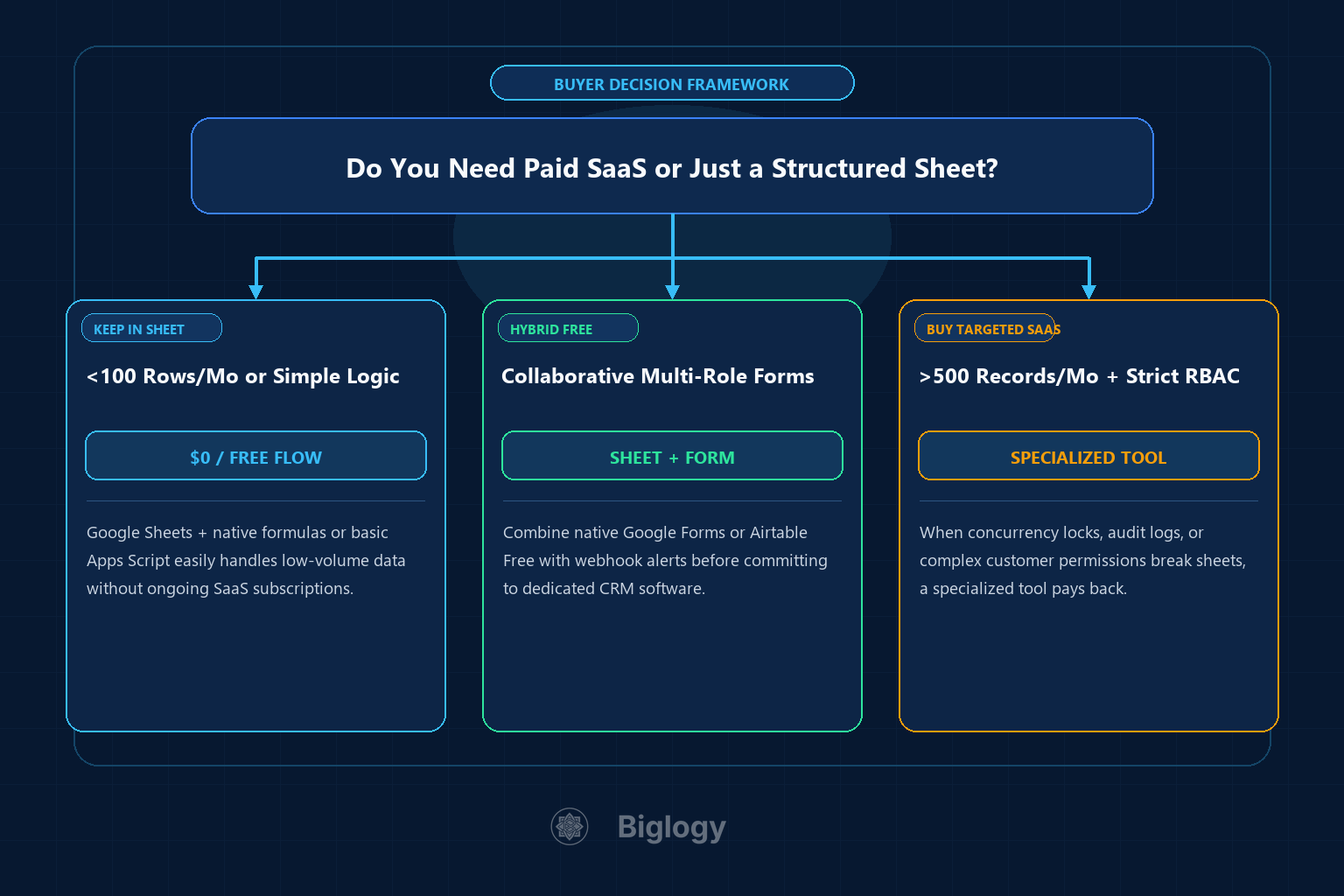
No-Tool First Step: The 3-Tab Lean Operations Architecture
Before looking at specialized project management or lightweight CRM platforms, build this lightweight 3-tab layout inside Google Sheets or Excel:
- Tab 1 (Raw Intake / Form Buffer): Collects unedited form submissions via Google Forms or a simple webhook. Protect this sheet so formulas cannot be accidentally overwritten.
- Tab 2 (Active Pipeline / Status Board): Pulls data using
=FILTER()or=QUERY(). Add dropdown status validation (e.g., New, In Review, Completed, Escalated) and an owner assignment column. - Tab 3 (Metrics & Historical Archive): Computes weekly volume, completion time, and bottleneck rates using native pivot tables or summary formulas.
Copyable Sheet-to-SaaS Transition Readiness Checklist
Paste this review block into your internal operations handbook to evaluate whether an existing sheet is ready for SaaS graduation:
SHEET-TO-SAAS READINESS CHECKLIST
Workflow Name:
Current Weekly Hours Spent in Sheet: ____   Current Monthly Rows: ____

GRADUATE TO SAAS ONLY IF 3 OR MORE STATEMENTS ARE TRUE:
[ ] 1. CONCURRENCY: Teammates frequently overwrite each other's cell edits or complain about lag.
[ ] 2. PERMISSIONS: We need external contractors to view only their assigned records without seeing financials.
[ ] 3. CLIENT PORTAL: Customers require self-service logins to upload assets or approve milestones.
[ ] 4. AUTOMATION CEILING: Our Apps Script or Zapier free tiers are failing due to execution time limits.
[ ] 5. FINANCIAL PAYBACK: The SaaS tool ($/mo) saves at least 3x its subscription cost in recovered billable hours.

DECISION:
- <3 Checks -> Optimize current Sheet layout, add data validation dropdowns, and stay lean.
- >=3 Checks -> Research dedicated SaaS using Biglogy's plan-limit verification guides.
Where Dedicated SaaS Wins (And How to Buy Transparently)
When a process outgrows sheets, purchasing software is an investment rather than an expense. However, ensure you audit pricing limits, seat multipliers, and annual lock-ins using Biglogy’s SaaS pricing verification methodology and our decision checklist on what not to automate. Our Publishing Charter reinforces our core stance: software should serve verified operational needs, never marketing pressure.
Frequently Asked Questions
When does a Google Sheet become dangerous for business data?
When sensitive customer payment data, unencrypted passwords, or healthcare details are stored in plain cells, or when more than five editors make simultaneous changes without cell protection rules.
Can Google Sheets handle customer follow-ups automatically?
Yes. As shown in our guide on building a no-code email drip campaign with Google Sheets, modest subscriber lists can run on basic scripts before upgrading to dedicated ESPs.
Is Airtable considered a spreadsheet or a SaaS platform?
Airtable bridges both worlds by providing a relational database behind a spreadsheet interface. It is ideal when linked records and file attachments are needed, though paid seat tiers scale quickly.
How long should we test a manual workflow before buying software?
We recommend running any new operational process in a structured document or spreadsheet for at least 30 to 60 days. This reveals edge cases that off-the-shelf software would struggle to accommodate.
Does choosing DIY over SaaS hurt business growth?
No. Lean operations protect cash flow and force teams to master their own process architecture before automating it. The most scalable companies automate processes they already understand deeply.
Editorial transparency: This guide provides independent buyer methodology with zero commercial sponsorships. Read Biglogy’s full standards in our Content Philosophy.
Related posts:
 How to Create a No-Code Email Drip Campaign with Google Sheets (Plus When to Upgrade to an ESP)
 Monthly or Annual? How to Decide on a Payment Plan for a SaaS Subscription?
 Why Your Automation Runs Without Errors Yet Still Breaks Leads
 Zapier vs Make vs n8n: Real Cost Analysis for Automating 1,000 Leads (2026)


Leave a Reply
Want to join the discussion?Feel free to contribute!