

What to Check Before Pasting Customer or Team Data Into AI Tools
Quick rule before you paste: Never rely on guesswork or assume ‘incognito chat’ protects confidential records. If the snippet contains customer personally identifiable information (PII), API keys/passwords, banking details, HR reviews, or signed NDA text, stop immediately—consumer chat workspaces should not receive raw sensitive records. Strip identifiers first, verify current workspace training retention and Data Processing Addendum (DPA) coverage, and follow a four-tier classification rule.
The fastest security leak in modern teams is not a zero-day exploit—it is someone copying an entire CRM row or support ticket into a personal browser tab to rewrite one polite reply.
The Everyday Workplace Risk: Convenience Outruns Governance
Employees rarely paste sensitive data out of malice; they do it under deadline pressure. A support lead pastes an email thread to draft an apology; an analyst drops a CSV of customer refunds to summarize churn patterns; a developer pastes an error trace containing an internal token. Once text enters an unvetted SaaS endpoint—even just once—teams lose clarity over where logs sit, how long prompts remain cached, whether human safety reviewers can inspect flagged snippets, and whether organizational privacy commitments under GDPR data minimization and processor rules (Articles 5 & 28) were bypassed.
Both Biglogy’s guides on reading vendor privacy policies and checking SaaS security pages for SOC 2, ISO 27001, and GDPR controls explain how to audit a vendor’s infrastructure; this guide translates those checks into a 30-second pre-paste habit for everyday work.
Four Hidden Traps When Teams Share Work Data With AI
- Confusing ‘Model Training Off’ with ‘Zero Retention’: Turning off training often means prompts will not train future base models, while vendors may still retain prompt logs temporarily for abuse/trust monitoring unless zero-data-retention (ZDR) terms apply.
- Personal vs. Workspace Account Drift: Someone logs into a free personal browser account on a work laptop, bypassing your company’s business workspace protections.
- Implicit Browser Extensions & Meeting Recorders: Third-party wrappers that capture whole page DOMs or raw threads under broad OAuth scopes.
- Browser/Account Sync & Shared Workspaces: Prompts containing customer disputes staying searchable in shared team history or exported into secondary tools.
Note also that OWASP Top 10 for LLM Applications treats Sensitive Information Disclosure as a primary architectural risk category—requiring explicit sanitization before data ever reaches prompt context.
Four-Tier Data Sensitivity Matrix (Green / Amber / Orange / Red)
| Sensitivity Tier | Examples From Daily Operations | Allowed AI Environment | Mandatory Pre-Paste Rule |
|---|---|---|---|
| Green: Public & Generic | Published help docs, anonymous writing structures, generic formula questions, public marketing drafts. | Any approved standard business or vetted AI workspace. | Double-check no stray client domain or internal URL sits in the header. |
| Amber: Redacted Internal | Anonymized process metrics, ticket wording with names/emails removed, rough internal SOP outlines. | Company-managed workspace with training disabled by contract. | Replace every name, email, invoice ID, and exact domain with placeholders first. |
| Orange: Restricted Work Context | Unredacted B2B pipeline projections, vendor rate cards, non-public roadmap milestones. | Enterprise/API tier under active DPA, SSO, and verified zero/short retention. | Confirm workspace tier & DPA sign-off before uploading files or threads. |
| Red: Hard Stop (Never Paste) | Raw PII/CRM exports, payment/tax IDs, API keys/tokens, passwords, health/HR records, signed NDA contracts. | NONE in general chat; keep strictly inside approved secured internal systems. | Do not paste. Work directly in secured vault/spreadsheet or strip fully offline. |
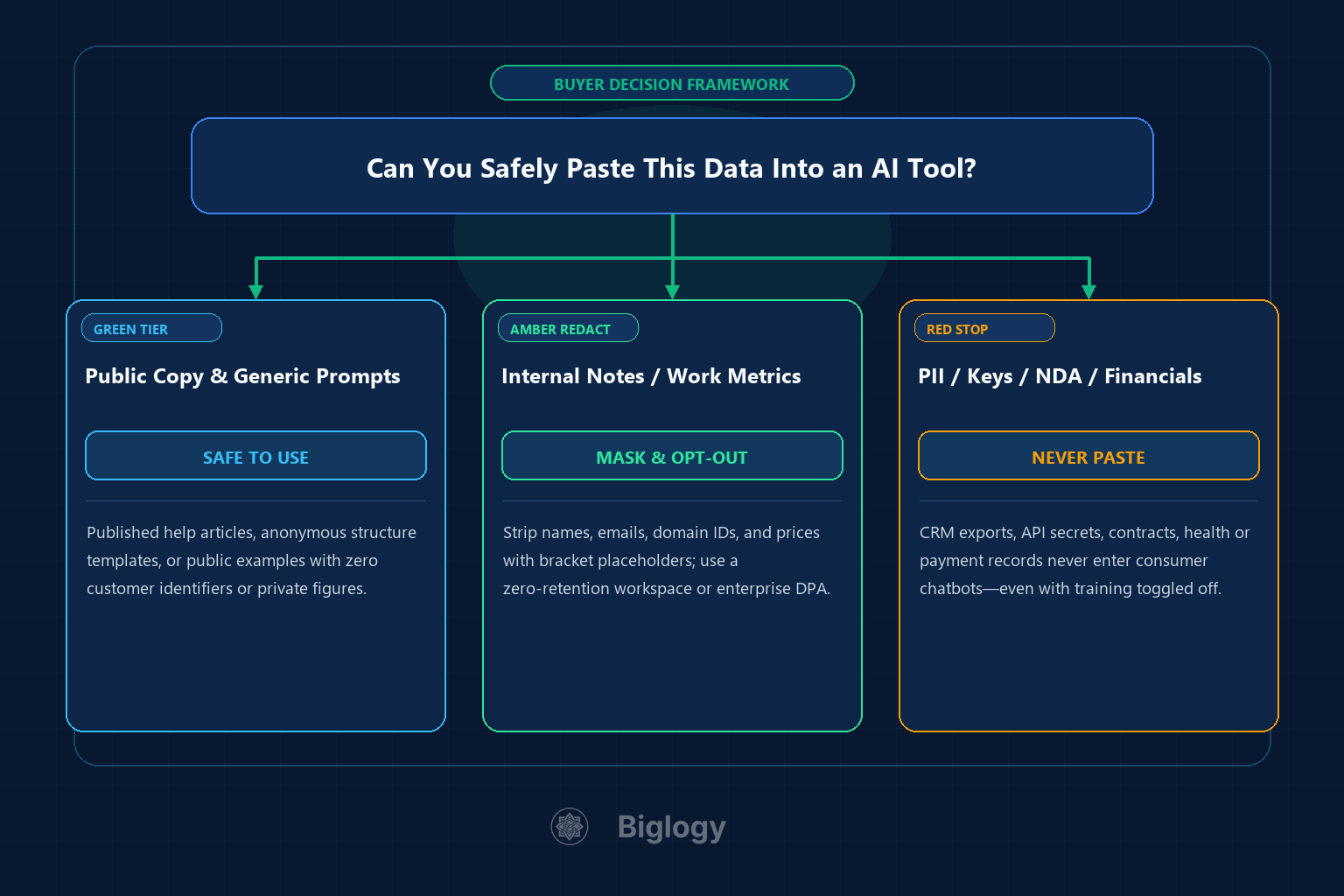
Pre-Paste Decision Gate: Green, Redact, or Stop
Keep this traffic-light split visible inside your team handbook so anyone knows within five seconds whether a snippet is safe as-is, needs anonymization first, or stays completely off AI chat.
No-Tool First Step: Master the 20-Second Anonymization Habit
You do not need expensive enterprise DLP middleware to cut 90% of accidental prompt leaks inside a small business. Apply manual placeholder masking in plain text or your editor before pasting:
- Strip all direct identifiers: Replace personal names (`Jane Doe` -> `[CONTACT_1]`), company names (`Acme Logistics` -> `[CLIENT_A]`), emails (`[email protected]` -> `[EMAIL_1]`), phone numbers, street addresses, and invoice IDs.
- Mask exact confidential totals if patterns suffice: Often an AI only needs ratios or structure (`Revenue: $1.42M` -> `Revenue: $140` / normalized index 100) to advise cleanly on formatting or Excel formulas.
- Strip secrets, tokens, and headers: Never paste HTTP
Authorizationheaders,.envsnippets, webhook secrets, or database connection strings into any debug prompt.
Copyable Team AI Pre-Paste Checklist & Redaction Key
TEAM PRE-PASTE AI GOVERNANCE CHECKLIST (SAVE TO INTERNAL WIKI)
==================================================================
BEFORE PASTING DATA INTO AN AI TOOL, CONFIRM ALL 5 ITEMS:
[ ] 1. ACCOUNT CHECK: Am I logged into the approved company workspace (NOT personal free account)?
[ ] 2. ZERO-RED TIER: Zero passwords, API tokens, tax/bank IDs, health/HR files, or raw NDA text?
[ ] 3. ANONYMIZED IDENTIFIERS: Replaced real customer names, emails, phones, & domains with [CLIENT_A] placeholders?
[ ] 4. RETENTION & TRAINING CHECK: Verified vendor workspace policy disables model training & logs match our retention rule?
[ ] 5. NO FILE AUTO-SYNC: Disabled third-party connectors / extensions pulling entire CRM/Drive folders unreviewed?

PLACEHOLDER MAPPING EXAMPLE (KEEP LOCALLY ONLY):
Original -> Safe Prompt Placeholder
Client Name -> [CLIENT_A] | Email -> [USER_EMAIL] | Order # -> [ID_01] | Token -> [REDACTED_SECRET]
What to Check on a Vendor’s Trust / Security Page Before Approving Team Access
Before greenlighting any team AI account on a recurring budget, check current published vendor terms directly (policies evolve frequently—always read the active page for your exact plan tier, not blog summaries):
- Plan-tier split: Consumer/Plus tiers and Business/Enterprise/API tiers frequently carry completely different default training and retention rules.
- DPA & subprocessor list: Confirm whether you can execute a DPA, where data is processed/stored regionally, and which LLM/telemetry subprocessors appear on the list (our SaaS Security Page Checklist details how to evaluate SOC 2 Type II and ISO 27001 reports without getting misled by marketing badges).
- Admin controls & deletion latency: Look for enforceable workspace-wide opt-outs, SSO/2FA requirements, and clear deletion timelines when workspaces close.
Seven-Day Team Verification Check
- Audit which browser extensions and logged-in personal AI tabs team members actually have open during regular client work.
- Pin the four-tier table + copyable placeholder guide cleanly in Slack/Notion and walk through two redacted vs. raw examples in a 10-minute team sync.
- Set quarterly checks whenever a vendor updates Terms of Service or launches a new default memory/connector toggle.
Frequently Asked Questions
If I turn off ‘Improve the model for everyone’ in chat settings, is pasting customer PII completely safe?
Not automatically. Opting out of model training only addresses base training reuse; vendors may still retain encrypted or readable logs temporarily for safety abuse review, and personal accounts still lack organizational audit trails, DPA coverage, or centralized deletion controls.
Are paid Business or API plans always safer than free consumer tiers?
Business, Enterprise, and API plans typically exclude business inputs from model training by default and offer stronger administrative controls and DPAs—though you must verify the exact current plan terms, data retention days, and regional residency options directly on the vendor’s active trust portal.
Should I anonymize B2B company names if there is no personal consumer email?
Yes. B2B proposals, pricing discounts, unreleased contract terms, and client complaints often carry strict confidentiality obligations even when individual consumer PII isn’t involved.
What should we do if someone accidentally pasted sensitive customer data or an API key?
If an API token, password, or webhook secret was pasted, rotate/revoke that credential immediately. Next, delete the chat thread where supported, log what was exposed internally, and notify your privacy/security owner per your incident procedure.
Can AI help build spreadsheets or templates without ever seeing live customer files?
Yes—and this is the cleanest workflow. Send column headers plus 3–5 invented synthetic dummy rows (`Jane Sample`, `$120`, `Plan A`), get your formula or transformation logic, and run it strictly inside your local spreadsheet against real rows.
Editorial transparency: This checklist provides operational governance guidance and does not constitute formal legal advice; consult qualified legal counsel for jurisdiction-specific compliance obligations. Read Biglogy’s principles in our Publishing Charter and Content Philosophy.


Leave a Reply
Want to join the discussion?Feel free to contribute!