

How to Automate Lead Capture: Form to Sheet or CRM to Follow-Up
Editorial disclosure: This implementation guide does not require a specific vendor. It includes one optional affiliate link for Make (marked rel="nofollow sponsored") as an example workflow router; Biglogy may earn a commission at no extra cost to you. Any additional commercial link must be separately verified, disclosed, and marked rel="sponsored".
A lead-capture automation should do more than copy an email address from a form. It should preserve consent context, validate required data, prevent uncontrolled duplicates, route the record to a clear system of truth, trigger an appropriate follow-up, and expose failures to a human owner. A fast workflow that silently loses or misroutes leads is not successful automation.
Reference Workflow
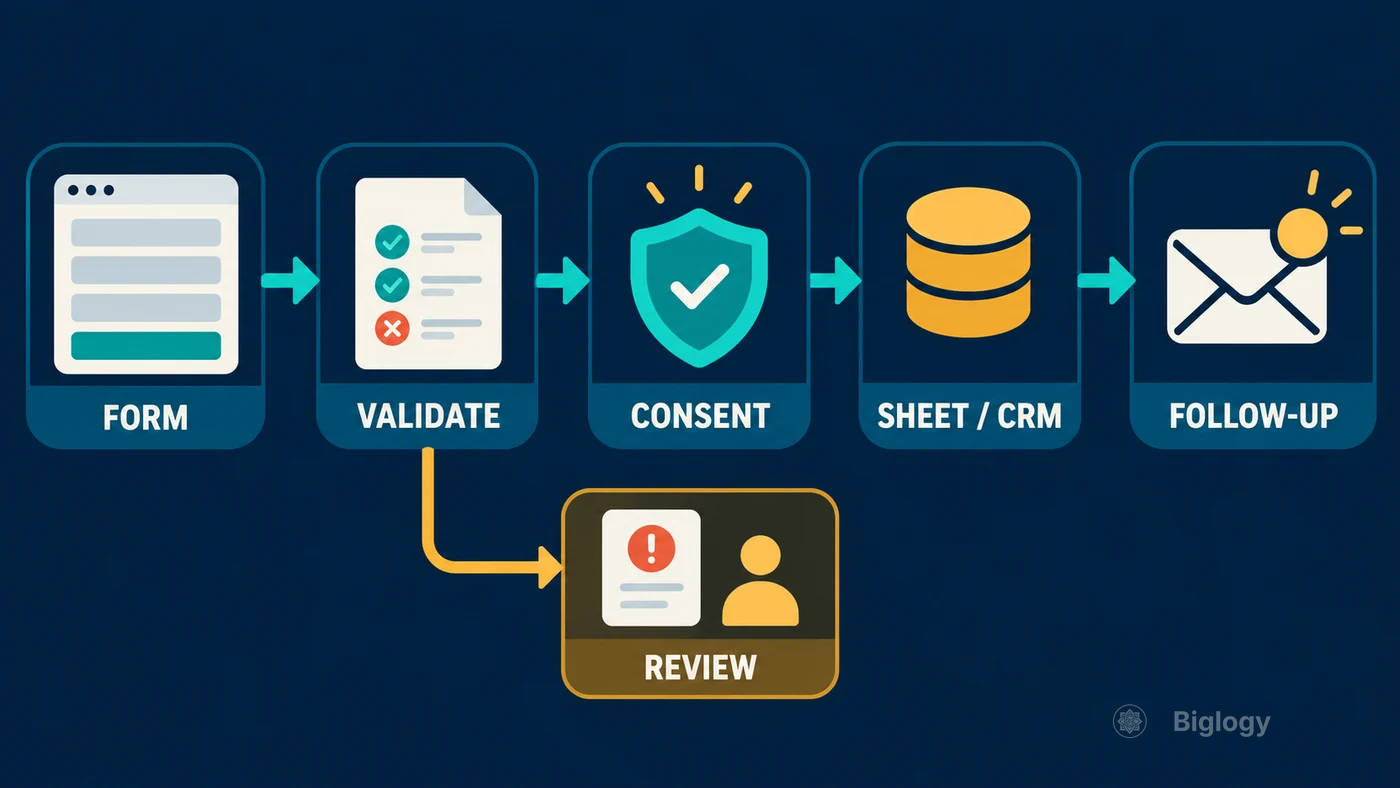
- The visitor submits a form.
- The system records the source page, timestamp, consent text or version, and required contact fields.
- A validation step rejects or quarantines malformed and obviously automated submissions.
- A deduplication rule searches the destination for an existing contact.
- The record is created or updated in a sheet or CRM according to an explicit rule.
- A confirmation or follow-up is sent only when the legal and operational conditions are satisfied.
- The workflow writes a result state and alerts an owner when it cannot complete.
Choose the System of Record
A spreadsheet can be sufficient for a low-volume, early-stage process if access is controlled and the team can maintain consistent columns. A CRM becomes more useful when several people manage conversations, pipeline stages, ownership, tasks, and reporting. Do not send every form submission to both systems without deciding which copy is authoritative.
| Need | Sheet may be enough | CRM is usually stronger |
|---|---|---|
| Low monthly volume | Yes, with controlled access and validation | Optional |
| Multiple sales owners | Fragile | Ownership and activity tracking are clearer |
| Pipeline stages and follow-up tasks | Manual discipline required | Designed for structured progression |
| Complex permissions | Often limited | Evaluate role and record controls |
| Fast prototype | Useful | May add setup overhead |
Define the Data Contract
Write the expected payload before opening an automation builder. A practical minimum might include email, first name, source URL, form identifier, consent state, consent text version, submission timestamp, campaign parameters when legitimately collected, and an idempotency key. Do not collect fields merely because the form tool offers them.
- Required: fields without which the intended response cannot occur.
- Optional: useful context that does not block the workflow.
- Derived: normalized values or classifications created by a transparent rule.
- Restricted: sensitive data that should not enter the workflow unless clearly necessary and protected.
- Retention: how long each class of data is needed and how deletion is propagated.
Build the Automation Safely
1. Trigger and authenticate
Use the form platform’s supported trigger or a secured webhook. Confirm what authenticates the request, whether retries occur, and whether the same submission can arrive more than once. Never place private credentials in public form code or a spreadsheet.
2. Validate and normalize
Trim whitespace, normalize case where appropriate, confirm required values, and reject payloads that do not match the contract. Validation is not permission to infer missing consent or invent a company name from an email domain.
3. Deduplicate deliberately
Decide whether a repeated email updates an existing contact, creates a new inquiry, or is ignored. Preserve the new source and timestamp when they matter. A deduplication rule should prevent duplicate messages without erasing legitimate repeat interest.
4. Separate confirmation from promotion
A person requesting a resource may need a confirmation or delivery message. That event does not automatically justify every future promotional campaign. Keep consent, suppression, transactional delivery, and marketing eligibility as explicit states.
5. Record outcomes and failures
Write a durable result such as created, updated, rejected, suppressed, or failed. Send an alert with enough context to investigate without exposing unnecessary personal data. A successful HTTP response is not proof that the lead entered the right segment or received the right message.
Test Cases Before Launch
- A valid new contact.
- An existing contact submitting the same form again.
- An existing contact submitting a different form.
- A malformed or blank email address.
- Missing consent metadata.
- Non-Latin characters and long field values.
- A temporarily unavailable sheet, CRM, or email platform.
- An expired credential.
- Two near-simultaneous submissions.
- An unsubscribe or deletion request after capture.
Use the operational checks in Biglogy’s email marketing system guide before designing automated follow-up. For product sales, align the lead workflow with the separate checkout and delivery process.
Monitoring Checklist
Plan rollback and reconciliation
Do not test rollback by deleting live contacts. Instead, use clearly labeled test records and document how an owner would isolate a bad run, stop further messages, identify affected records, correct the destination, and replay only the eligible events. Keep a source event identifier so the same submission can be reconciled across the form, automation history, sheet or CRM, and email platform. When a failure state is uncertain, pause automated follow-up until the records are compared; an uncontrolled retry can create duplicate contacts or messages.
- Count form submissions and destination records for the same period.
- Review rejected and quarantined events.
- Monitor workflow failures and credential expiry.
- Check duplicate creation and duplicate sending.
- Sample consent and source fields for accuracy.
- Verify unsubscribe and suppression propagation.
- Review who can view, export, and delete lead data.
- Document the person responsible for weekly reconciliation.
When to Use a Sheet, CRM, or Both
Use a sheet when the process is small, transparent, and manually reviewable. Use a CRM when ownership, pipeline state, permissions, activities, and follow-up require structure. Use both only when each has a distinct purpose—for example, a CRM as the system of record and a restricted reporting sheet refreshed from approved fields. Avoid uncontrolled two-way synchronization until conflict rules are proven.
If you are evaluating middleware to route form payloads reliably, read our Make.com review for webhook and error-handling design. For consent-first email follow-up workflows, consult our GetResponse review, and for B2B prospect enrichment workflows before CRM entry, see our Apollo.io review.
Official Sources Reviewed
- Make Help Center: webhooks
- Zapier Help: Google Sheets connection workflow
- GetResponse official marketing automation overview
Source review date: October 24, 2026. This guide is operational guidance, not legal advice; obtain qualified advice for jurisdiction-specific consent and privacy obligations.


Leave a Reply
Want to join the discussion?Feel free to contribute!