

How to Audit Overlapping SaaS Subscriptions Without Disrupting Work
Quick audit rule: Never start a SaaS cleanup by asking teammates what tools they remember paying for, and never cancel an active account on the same afternoon you spot a duplicate charge. Pull the last 90 days of bank and card statements first, map hidden webhooks, embed links, and DNS records before changing billing, and enforce a 7-to-14-day parallel freeze window before hard cancellation.
The real risk during a subscription cleanup is rarely losing a flashy AI feature—it is canceling a forgotten form, scheduler, or SMTP bridge quietly powering an active checkout or onboarding email.
The Overlapping-Stack Symptom: Paying Twice While Afraid to Cancel Anything
Small teams rarely adopt redundant software on purpose. Redundancy grows organically: a founder opens a project tracker, marketing buys an email suite with built-in forms, sales signs up for a standalone scheduler, and someone trials a new AI meeting recap app on a corporate card. Six months later, three tools offer forms, two handle landing pages, and nobody is quite sure which embedded calendar or API token still triggers live customer notifications.
That fear creates paralysis—teams keep paying for dead or overlapping seats rather than risk breaking production. Once your core architecture principles from Biglogy’s small-business software stack guide are clear, a methodical audit lets you cut overlap systematically with zero downtime.
Root Cause: Why Rushed SaaS Cancellations Cause Operational Breakages
- Auditing by memory instead of billing ledgers: Annual renewals and legacy founder cards vanish from day-to-day visibility until renewal day.
- Invisible technical glue: A ‘unused’ tool’s UI may have zero human logins while still hosting a live Zapier/Make API key, custom subdomain redirect, or client portal asset.
- Premature hard deletes: Deleting workspaces before exporting CSV/JSON records, invoice history, and active subscriber consent timestamps.
- Trap of shiny ‘all-in-one’ swaps without migration checks: Migrating mid-month without verifying domain reputation, checkout webhooks, or subscription seat terms.
No-Tool First Step: Do the 90-Minute Spreadsheet & Billing Ledger Audit
You do not need a spend-management SaaS platform just to audit 10 to 40 tools. Two native sources already hold 100% of the truth: your card/bank statements and your shared team inbox.
- Export 90 days of statements (plus last year’s annual invoices): Filter recurring charges from checking, cards, PayPal, Apple/Google subscriptions, and marketplaces. Never miss quarterly or annual plans billed outside the current month.
- Categorize by Primary Job, Not Marketing Label: Tag every line item by what job your team relies on it for today (CRM, Email Sending, Forms, Docs/Wiki, Automation, Video/Meetings, Hosting/SEO). Whenever two active charges share the same job column, mark a consolidation candidate.
- Inspect real 30-day usage & check renewal windows: Check Admin -> Members/Billing inside overlapping apps to identify inactive seats, unused add-ons, and exact cancellation notice deadlines (often 3–30 days prior on annual contracts). Cross-check billing structures using Biglogy’s guides on verifying SaaS pricing and plan limits and choosing between monthly versus annual SaaS subscriptions.
Four-Bucket Overlap Triage Matrix
| Audit Bucket | Signals Observed | Safe Action Before Touching Billing | Target Timeline |
|---|---|---|---|
| 1. Redundant Unused / Zombie Tool | Zero logins >30 days, zero active webhooks/API traffic, clear replacement already paid. | Export archive (CSV/JSON), revoke keys, cancel before auto-renewal lock. | Complete in 48 hours |
| 2. Live Overlap (Consolidate to Primary) | Both tools hold active forms, subscribers, courses, or automations for the same job. | Replicate destination routes first, run 7-day parallel test, swap live links, then cancel legacy app. | 7–14 day phased swap |
| 3. Essential Tool With Seat / Tier Bloat | Critical system of record, but paying for ex-contractor seats or enterprise features nobody uses. | Remove idle seats, downgrade tier ahead of next renewal cycle; touch zero core APIs. | Next billing boundary |
| 4. High-Risk Dependency / Pause Needed | Hosts live DNS/SMTP, billing portal, active affiliate tracking, or client-facing legal files. | Assign technical owner first; trace DNS/SPF/DKIM, checkout webhooks, and URL redirects before migrating. | Dedicated migration sprint |
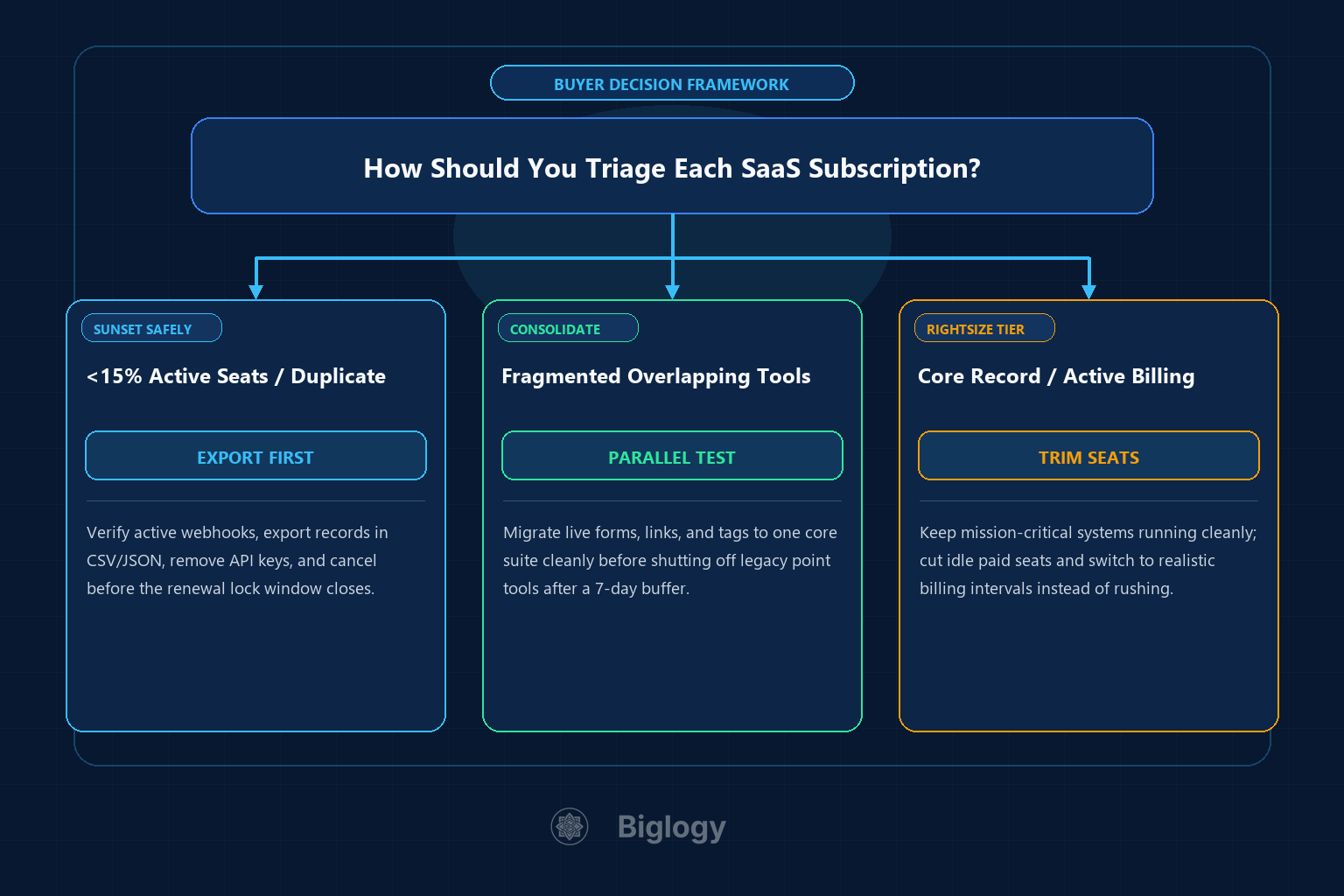
Triage Decision Gate: Consolidate vs. Sunset vs. Rightsize
Use this three-path filter whenever a subscription looks duplicative so you avoid cutting load-bearing components.
Copyable SaaS Audit & Safe-Shutdown Checklist Sheet
Copy these headers into Google Sheets or Notion and require every row marked SUNSET or CONSOLIDATE to clear all six technical checks before hitting Cancel:
SAAS AUDIT COLUMNS (CSV / SHEET TEMPLATE)
Vendor | Monthly_USD | Billing_Cycle | Renewal_Date | Job_Category | Active_Users_30d | Bucket | Owner | Status

MANDATORY PRE-CANCEL CHECKLIST (ALL 6 MUST PASS):
[ ] 1. WEBSITE & FORMS: Searched live site/landing pages for embed scripts, forms, or calendar links pointing here.
[ ] 2. WEBHOOKS & AUTOMATION: Checked Zapier / Make / n8n / native app connections for active keys using this vendor.
[ ] 3. EMAIL & DNS: Checked TXT/CNAME records if tool sends marketing or transactional email (SPF/DKIM/DMARC).
[ ] 4. PAYMENTS & PORTAL: Confirmed zero active recurring customer subscriptions or webhooks tied inside this workspace.
[ ] 5. FULL DATA EXPORT: Downloaded contacts, consent opt-in timestamps, invoices, templates, and media locally.
[ ] 6. 7-DAY PARALLEL BUFFER: Disabled new user signups/embeds and monitored zero silent traffic for 7 days before closing.
Use Biglogy’s Dedicated Migration & TCO Calculators Before Switching
Savings evaporate quickly if consolidating tools triggers higher transaction fees, deliverability drops, or months of rebuild labor. Model true first-year total cost—including usage overages and migration risk—using Biglogy’s calculators and runbooks before signing any annual consolidation contract:
- Digital Product Sales Funnel Cost Calculator (12-Month TCO Breakdown)
- Shopify vs WooCommerce First-Year Total Cost of Ownership Calculator
- Zapier vs Make vs n8n: Real Cost Analysis for 1,000 Leads
- Mailchimp to GetResponse Migration Checklist (Consent & Deliverability)
- Online Course Platform Migration Checklist (Video, Students & Subscriptions)
Verification After Cutting Overlap
- 48-hour smoke check: Submit every live public lead form, calendar link, and checkout flow immediately after re-wiring away from a retired tool.
- Billing statement check on day 35: Verify no ghost seat charge or ancillary add-on renewed on a secondary corporate card.
- Quarterly 20-minute calendar hold: Re-export card recurring lines once every 90 days so shadow trials never compound quietly again.
Frequently Asked Questions
Should I start my SaaS audit with IT logs or bank/card statements?
Start with 90 days of bank and credit card statements (plus annual receipts from your accounting folder). SSO or IT app lists frequently miss solo tools purchased directly on department or personal cards.
Can I safely switch from an annual plan to monthly right before canceling?
Annual plans usually stay active through the paid term without partial refunds, so cancel auto-renewal immediately and set a calendar reminder 14 days before expiry to complete your export and shutoff cleanly.
Is merging three tools into one ‘all-in-one’ suite always cheaper?
Not automatically. Verify contact tier thresholds, hidden email/SMS send caps, seat minimums, and transaction fees across a realistic 12-month growth baseline before assuming a single platform saves net spend.
What should we export before closing an old email or CRM subscription?
Export full contact CSVs, suppression/unsubscribe lists (critical so you never accidentally re-mail opted-out recipients), consent source/timestamps, historical invoices, and tag mappings.
How long should we wait between cutting over workflows and deleting the old account?
Keep at least a 7-to-14-day read-only overlap whenever billing cycles allow. That grace period lets stray booked calendar links or trailing webhooks surface before permanent workspace deletion.
Editorial transparency: This audit playbook is non-commercial buyer guidance. Learn how Biglogy evaluates SaaS economics cleanly in our Software Evaluation Methodology and Publishing Charter.
Related posts:
 Monthly or Annual? How to Decide on a Payment Plan for a SaaS Subscription?
 How Should an Annual Content Audit Be Conducted for Biglogy?
 Online Course Platform Migration Checklist: Moving Video, Students, and Subscriptions Safely (2026)
 Mailchimp to GetResponse Migration Checklist: How to Switch Without Losing Consent or Deliverability (2026)


Leave a Reply
Want to join the discussion?Feel free to contribute!