

Thinkific vs LearnWorlds vs Podia: 2026 3-Way Online Course Platform Comparison
Last fact-check: November 11, 2026 Research method: Desk research using the vendors’ public pricing and feature documentation. Biglogy did not conduct a hands-on product test for this comparison. Affiliate disclosure: This draft contains no affiliate tracking links. Biglogy may add clearly disclosed affiliate links only after separately verifying the destination and commercial relationship.
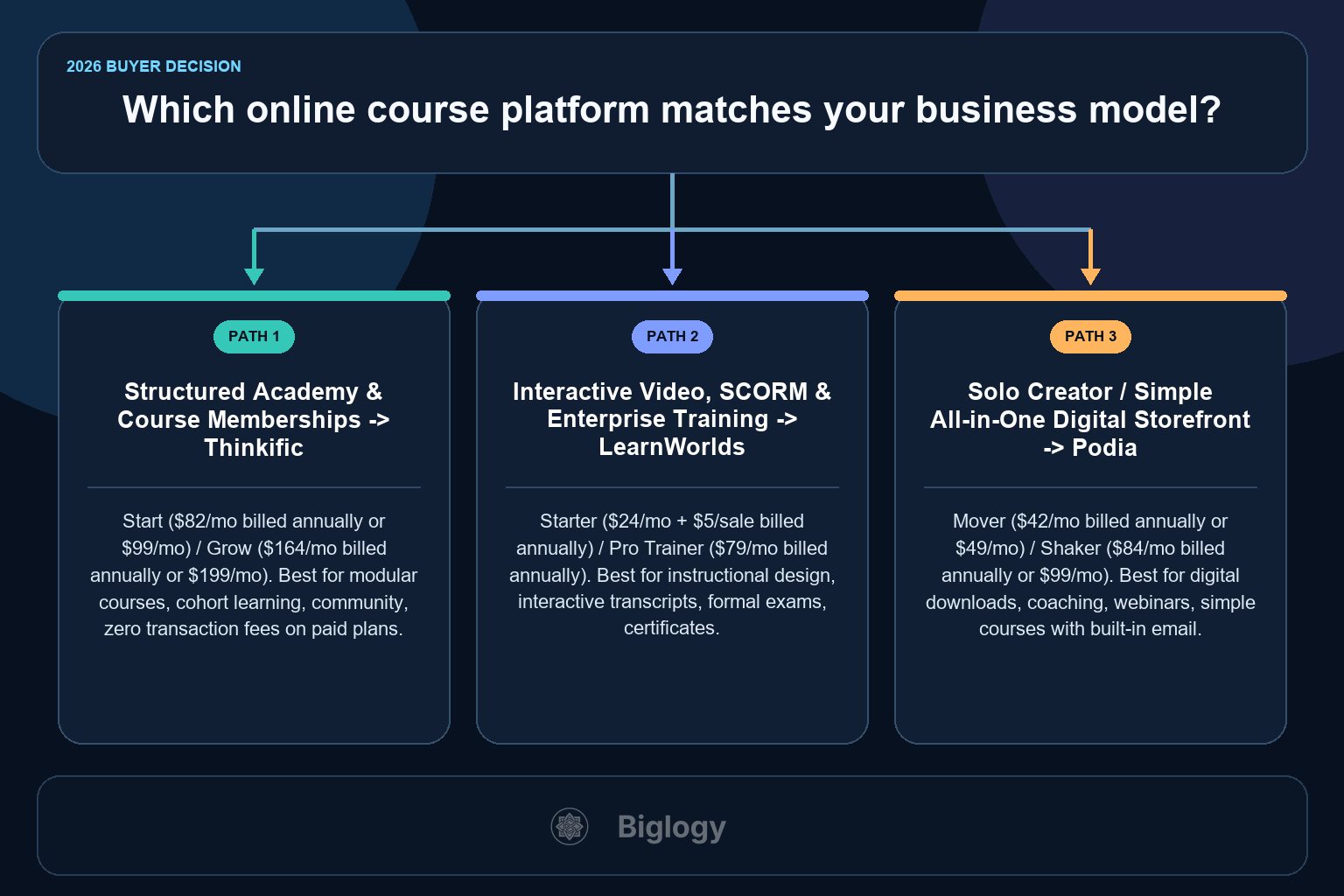
Thinkific, LearnWorlds, and Podia can all sell online courses, but they are built around different priorities. Creators comparing all-in-one alternatives should also consult our systeme.io vs Kajabi comparison, and those pairing their courses with dedicated creator email tools can read our Kit review for creators. Thinkific is the strongest general-purpose choice for a structured course business. LearnWorlds is the better fit when assessments, interactive learning, SCORM content, and training operations matter more than simplicity. Podia is the most natural option for a solo creator who wants one straightforward storefront for courses, downloads, community, and email.
That is the short verdict. The more useful answer depends on what you are selling, how formal the learning experience must be, and how transaction fees change your real monthly cost.
Thinkific vs LearnWorlds vs Podia at a glance
| Best for | Recommended platform | Why |
|---|---|---|
| A structured online academy or course-led membership | Thinkific | Strong course, cohort, certificate, membership, community, and commerce foundation without starting from an enterprise LMS workflow |
| Professional education, certification, or B2B training | LearnWorlds | Deeper assessment, interactive-video, SCORM, reporting, and multi-admin options on the relevant plans |
| A solo creator selling several kinds of digital products | Podia | Courses, downloads, coaching, events, community, website, checkout, and email live in one comparatively simple system |
| The lowest initial platform bill for a small number of sales | LearnWorlds Starter or Podia Mover | The base subscription is lower, but per-enrollment or percentage fees must be included |
| Comparing fixed-price options as sales grow | Compare Thinkific Start, LearnWorlds Pro Trainer, and Podia Shaker | Pro Trainer removes LearnWorlds Starter’s enrollment fee and Shaker removes Podia Mover’s platform fee; Thinkific Start is a fixed-price comparison baseline, while payment-processing and gateway terms still apply |
Our overall pick for most independent educators: Thinkific. It occupies the middle ground: more course-focused than Podia, but less specialized than LearnWorlds. Choose LearnWorlds when the learning system itself is the product. Choose Podia when speed and creator commerce matter more than LMS depth.
How we compared the platforms
This comparison evaluates the three services across five decisions:
- How well the platform supports structured learning.
- Whether it can handle community, memberships, and products beyond courses.
- What the current public plans cost.
- How platform-level sales fees change the effective cost.
- Which operational model each platform suits.
Feature existence comes from official vendor documentation. The recommendations are editorial judgments based on those documented capabilities; they are not claims that one interface is objectively easier or that any platform will improve course completion or revenue.
Prices and limits change frequently. Confirm the Thinkific pricing page, LearnWorlds pricing page, and Podia pricing page before buying, especially if you intend to pay annually.
The core difference: academy, learning system, or creator storefront
Thinkific: a balanced course-business platform
Thinkific is designed around selling learning products. Its current Start plan includes unlimited courses, video and multimedia lessons, student discussions, live cohorts and coaching, quizzes, assignments, certificates, bundles, payment plans, memberships, subscriptions, and a custom domain. That combination makes it suitable for an educator who wants to build a recognizable academy rather than publish a single lightweight product.
The platform also has a clear expansion path. Grow adds items such as more communities, bulk enrollment, B2B sales and invoicing, API access, webhooks, and student engagement reports. Expand raises administrative and community limits. Thinkific Plus is where SCORM, SSO, learning paths, exams, advanced roles, and custom analytics appear.
That plan structure is important. Thinkific can support more formal training, but several enterprise-LMS capabilities sit above its mainstream creator plans. Do not assume that a feature shown anywhere on the Thinkific site is included in Start.
LearnWorlds: the deepest learning toolkit of the three
LearnWorlds puts more emphasis on the learning environment itself. Its public comparison lists assessment tools, interactive video, certifications, SCORM and HTML5 packages, learning paths, course reporting, multiple administrator levels, and training-oriented integrations. The exact depth changes by plan: Starter has essential assessments, while Pro Trainer and Learning Center unlock progressively stronger course, branding, reporting, and administration options.
The distinction is practical. If you need students to submit work, earn certificates, follow controlled paths, consume SCORM content, or participate in a program that must be reported to a client, LearnWorlds deserves the closest evaluation.
That depth can also be unnecessary. A creator selling a short video course and a few templates may be paying for a system designed around more formal training operations.
Podia: a creator business in one storefront
Podia treats courses as one product type inside a broader creator store. Every current paid plan includes online courses, digital downloads, coaching, events, community, a website and blog, landing pages, built-in checkout, and email tools. This is attractive when the business model is mixed: perhaps a mini-course, an ebook, a paid community, and occasional coaching.
Podia’s tradeoff is equally clear. Its public positioning and plan table emphasize selling and delivery rather than advanced assessment, credentialing, or enterprise learning administration. If your requirements document includes SCORM, formal certification rules, granular learning reports, or multi-client training, Podia is unlikely to be the first platform to test.
Course creation and student experience
All three platforms can deliver ordinary video, text, and downloadable course content. The differences become meaningful when the course is more than a sequence of lessons.
Thinkific offers a strong mainstream teaching set on Start: quizzes, assignments, certificates, live cohorts, coaching, discussions, and payment plans. It is the most balanced choice when course structure matters but you do not yet need a specialized corporate LMS.
LearnWorlds goes further on interactive and standards-based learning. Its official pricing comparison lists interactive video tiers, AI-assisted assessments, certifications, and SCORM/HTML5 support beginning on Pro Trainer, with higher allowances on more expensive plans. This makes it the strongest candidate for instructional designers and professional training providers.
Podia covers simpler course delivery while keeping the rest of the creator business close at hand. That can reduce operational friction, but it should not be mistaken for the same learning depth. A streamlined lesson sequence may be exactly right for a workshop or mini-course and inadequate for a regulated certification program.
Before choosing, build the same small pilot in each shortlisted platform: one module, one video, one downloadable resource, one assessment, one completion rule, and one checkout. Do not buy an annual plan based only on a feature checklist.
Community, memberships, and digital products
Thinkific supports communities, memberships, subscriptions, cohorts, and course bundles, so it works well when a community reinforces the learning program. Its Start plan provides the foundation; higher plans increase community and administration capacity.
LearnWorlds includes a built-in community and social network across its public plan comparison. Its strongest case remains learning-led community: discussion and engagement around a structured academy or training program.
Podia includes community alongside courses, downloads, coaching, and events. It is the most straightforward conceptual fit when the community is part of a creator storefront rather than a formal learning operation. Podia also includes email features with plan-specific subscriber allowances, so list size belongs in the cost calculation.
If your main product is community rather than education, none of these three should automatically win. Define the required moderation, events, member directory, mobile, and engagement workflows before treating an included community feature as sufficient.
2026 pricing: the current public plans
The following figures were checked on November 11, 2026. They are listed in US dollars and exclude taxes, payment-processor charges, optional add-ons, and usage-based extras.
| Platform | Entry plan used in this comparison | Next relevant plan | Higher public plan |
|---|---|---|---|
| Thinkific | Start: $109/month, or $82/month billed annually | Grow: $219/month, or $164/month billed annually | Expand: $499/month, or $374/month billed annually; Plus is custom |
| LearnWorlds | Starter: $49/month or $44/month billed annually, plus $5 per course enrollment | Pro Trainer: $99/month or $79/month billed annually, with no enrollment fee | Learning Center: $299/month or $249/month billed annually; Corporate is custom |
| Podia | Mover: $49/month or $42/month billed annually, plus a 5% Podia transaction fee | Shaker: $99/month or $84/month billed annually, with no Podia transaction fee | Earthquaker: $179/month or $150/month billed annually |
Thinkific currently offers a 30-day free trial rather than a free plan. Podia advertises a 14-day free trial. LearnWorlds also provides a trial entry point on its pricing page. Trial access is useful for evaluation, but it does not remove the need to check what will remain available on the paid plan you select.
Important fee caveat
“No enrollment fee” or “no Podia transaction fee” does not mean payment acceptance is free. Stripe, PayPal, Thinkific Payments, or another supported processor may charge processing fees. Thinkific also states that additional third-party gateway fees can apply in some situations and vary by plan and country. Compare fees for your location, currency, gateway, and billing method.
The transaction-fee trap, with real arithmetic
A low subscription price can become the expensive choice once sales increase. To make that visible, the next table models a $50 course at three monthly revenue levels. It uses month-to-month subscription prices and includes only the vendor’s platform-level enrollment or transaction fee. Payment processing, tax, email overages, and add-ons are excluded.
| Monthly course revenue | Sales at $50 each | Thinkific Start | LearnWorlds Starter | LearnWorlds Pro Trainer | Podia Mover | Podia Shaker |
|---|---|---|---|---|---|---|
| $1,000 | 20 | $109 | $149 | $99 | $99 | $99 |
| $5,000 | 100 | $109 | $549 | $99 | $299 | $99 |
| $15,000 | 300 | $109 | $1,549 | $99 | $799 | $99 |
These are not total ownership costs, but they reveal two useful thresholds.
LearnWorlds: Starter costs $50 less per month than Pro Trainer but adds $5 per enrollment. At 10 paid enrollments the plans are equal at $99; above 10, Pro Trainer is cheaper on platform and enrollment fees alone. Pro Trainer also adds capabilities that may be required regardless of sales volume.
Podia: Mover costs $50 less per month than Shaker but adds 5% of sales. At $1,000 in monthly revenue the two are equal at $99; above $1,000, Shaker is cheaper on subscription plus Podia’s transaction fee alone.
Thinkific: Start has the highest base price in this narrow entry-plan comparison, but there is no per-enrollment fee shown in the public Start plan. Gateway and processing fees still require a separate country-specific check.
The larger lesson is to model cost using expected enrollments and revenue, not just the number printed at the top of a pricing card. Biglogy’s guide to verifying SaaS pricing and limits explains a repeatable way to perform that check.
Ten-point comparison matrix
| Decision factor | Thinkific | LearnWorlds | Podia |
|---|---|---|---|
| Primary orientation | Course business and academy | Learning platform and training operation | Creator storefront |
| Standard course delivery | Strong | Strong | Good for simpler programs |
| Assessments and certificates | Included on Start; advanced needs may require higher tiers | Strongest of the three on relevant plans | Not the main differentiator |
| Interactive video | Not the central public-plan differentiator | Clear strength, with plan-based levels | Not the central public-plan differentiator |
| SCORM | Thinkific Plus | Pro Trainer and above, with plan limits | Not presented as a core capability |
| Community and memberships | Strong course-community balance | Built in and learning-led | Strong fit for a simple creator community |
| Digital downloads and mixed products | Supported | Course and training focus | Strongest conceptual fit |
| B2B training | Grow/Expand/Plus offer a progression | Strong fit, particularly higher tiers | Limited fit for formal B2B requirements |
| Simplicity | Moderate | Most specialized | Most streamlined conceptually |
| Cost risk to watch | Higher starting subscription and plan-gated advanced features | $5 Starter enrollment fee | 5% Mover fee and email subscriber limits |
Which platform should you choose? Three scenarios
1. Solo creator selling ebooks, templates, and a mini-course
Choose Podia Mover while revenue is low and the 5% fee is acceptable. Move to Shaker once monthly sales approach $1,000, or sooner if you need its affiliates, upsells, assistant seat, PayPal, or Zapier features. Podia keeps the website, checkout, email, community, downloads, and course in one product.
Do not choose Podia solely because it feels simpler on paper. Confirm that its assessment, reporting, email allowance, and community controls are enough for your next 12 months.
2. Independent educator building a serious academy
Choose Thinkific Start when you need structured courses, cohorts, certificates, memberships, subscriptions, and a custom domain in one course-led system. Consider Grow when B2B invoicing, bulk enrollment, multiple communities, API access, or engagement reporting becomes necessary.
Thinkific is the safest default of the three for this profile because it leaves room to grow without making enterprise training features the starting point.
3. Training provider selling certification or client programs
Start your evaluation with LearnWorlds Pro Trainer and Learning Center. Pro Trainer removes the enrollment fee and includes certificates plus a limited number of SCORM packages. Learning Center adds stronger white-label, automation, reporting, admin, and client-group capabilities.
Also compare Thinkific Plus if SSO, SCORM, learning paths, exams, and custom analytics are required. Request written confirmation for every essential limit before signing a long-term contract.
When none of the three is the right answer
Do not force a creator platform into an enterprise procurement problem. If you require regulatory compliance workflows, complex role hierarchies, strict data residency, extensive HRIS integration, proctored exams, contractual service levels, or thousands of internal employees, create a formal requirements matrix and evaluate dedicated enterprise LMS products.
The opposite is also true. If you only need to sell a PDF or a small video bundle, a full course platform may add unnecessary cost and administration. Map the complete digital-product checkout and delivery workflow before deciding that an LMS is necessary.
Final verdict
Choose Thinkific if you want the best overall balance for a structured course business, memberships, cohorts, and a growing academy.
Choose LearnWorlds if learning design, interactive video, assessments, certification, SCORM, reporting, or B2B training requirements drive the decision.
Choose Podia if you are a solo creator who values a simple all-in-one storefront for courses, downloads, community, coaching, events, checkout, and email.
The decisive question is not “Which platform has the cheapest plan?” It is “Which platform supports the learning and sales workflow I will actually operate, at my expected volume?” Calculate the first three months of subscription fees, platform fees, processing, email capacity, add-ons, and migration work. Then test the same representative course and checkout in the finalists before paying annually.
Frequently asked questions
Is Thinkific better than LearnWorlds?
Thinkific is the better general-purpose choice for many independent educators and course businesses. LearnWorlds is stronger when interactive learning, SCORM, assessments, certificates, training reports, or multi-client operations are central requirements. “Better” depends on whether you need a balanced course-commerce platform or a deeper learning system.
Is Podia better than Thinkific for beginners?
Podia is often the more natural fit for a beginner selling a mixture of downloads, coaching, community access, and a simple course. Thinkific is the stronger starting point when the course experience and academy structure are the business. Ease of use is subjective, so test both rather than relying on a generic beginner label.
Which platform is best for an online academy?
Thinkific is the best default for a creator-led online academy. LearnWorlds may be better for a professional training academy with formal assessment, certification, SCORM, or client reporting needs. Podia fits a lighter creator store more naturally than a complex academy.
Which platform has the lowest transaction fees?
LearnWorlds Pro Trainer and higher plans list no enrollment fee, while Podia Shaker and Earthquaker list no Podia transaction fee. Thinkific’s current Start pricing card does not list a per-enrollment charge, but Thinkific says processing and third-party gateway fees can vary. All three still involve payment-processing costs or other payment terms that require verification.
When should I upgrade from LearnWorlds Starter?
On fees alone, Starter’s $49 subscription plus $5 per enrollment equals the $99 Pro Trainer subscription at 10 paid enrollments per month. Above 10 enrollments, Pro Trainer costs less on those two items and includes additional capabilities. Confirm that this arithmetic still matches the live pricing page when you buy.
When should I upgrade from Podia Mover to Shaker?
Mover’s $49 monthly price plus a 5% Podia fee equals Shaker’s $99 monthly price at $1,000 in monthly sales. Above that revenue, Shaker is cheaper on those items alone. Shaker may be justified earlier if you need affiliates, upsells, PayPal, Zapier, a larger product allowance, or an assistant seat.
Does Thinkific have a free plan?
No. Thinkific’s public pricing FAQ currently says it offers a 30-day free trial instead of a free plan.
Which platform supports SCORM?
LearnWorlds lists SCORM and HTML5 support from Pro Trainer upward, with plan-based package limits. Thinkific lists SCORM under Thinkific Plus. Podia does not present SCORM as a core public-plan capability.
Can I sell memberships and community access on all three?
Yes, all three document community or membership capabilities, but the product emphasis differs. Thinkific connects them to a course business, LearnWorlds to a learning environment, and Podia to a broader creator storefront. Check plan-specific limits and the member experience before committing.
Should I pay annually?
Only after testing the complete workflow and verifying cancellation, refund, migration, and plan-limit terms. Annual pricing lowers the effective monthly cost, but it also increases commitment and switching risk.


Trackbacks & Pingbacks
[…] deliver digital products. Those wanting a dedicated multi-platform perspective can also read our Thinkific vs LearnWorlds vs Podia comparison or our systeme.io vs ClickFunnels comparison. The meaningful difference is not a checklist item. It […]
Leave a Reply
Want to join the discussion?Feel free to contribute!