

How to Create a No-Code Email Drip Campaign with Google Sheets (Plus When to Upgrade to an ESP)
Editorial & Deliverability Disclosure: Biglogy evaluates lightweight automation stacks transparently using 2026 Google Workspace sending quotas, bulk sender authentication rules (SPF/DKIM/DMARC/RFC 8058), and ESP pricing brackets. Links to GetResponse (/go/getresponse/), Kit (/go/kit/), and Brevo (/go/brevo/) connect through Biglogy’s portal directory without undisclosed paid sponsorship; links to Make.com (/go/make/) carry an active affiliate token (rel="nofollow sponsored").
Do you really need a $19–$59/month email marketing subscription on Day 1 if you only capture 3 to 5 discovery leads per week? For solo consultants, B2B agency founders, and pre-launch SaaS builders testing their offer, the honest answer is often no. You can run a clean, stateful no-code email drip campaign directly out of Google Sheets paired with Make.com, Zapier, or Google Apps Script—giving you full CRM-style visibility over every recipient row without paying for unused marketing suites.
However, spreadsheet mailers come with strict technical and legal walls that most YouTube tutorials skip. Gmail is not an Email Service Provider (ESP), lacks native one-click unsubscribe headers, and restricts daily volume aggressively. In this architectural blueprint, you get the exact 11-column Google Sheets state schema, the step-by-step scheduler filter logic, duplicate-send protection, and the concrete volume threshold where upgrading to a real ESP protects your primary domain reputation.
Short Answer: When a Google Sheets Drip Works—and When It Breaks
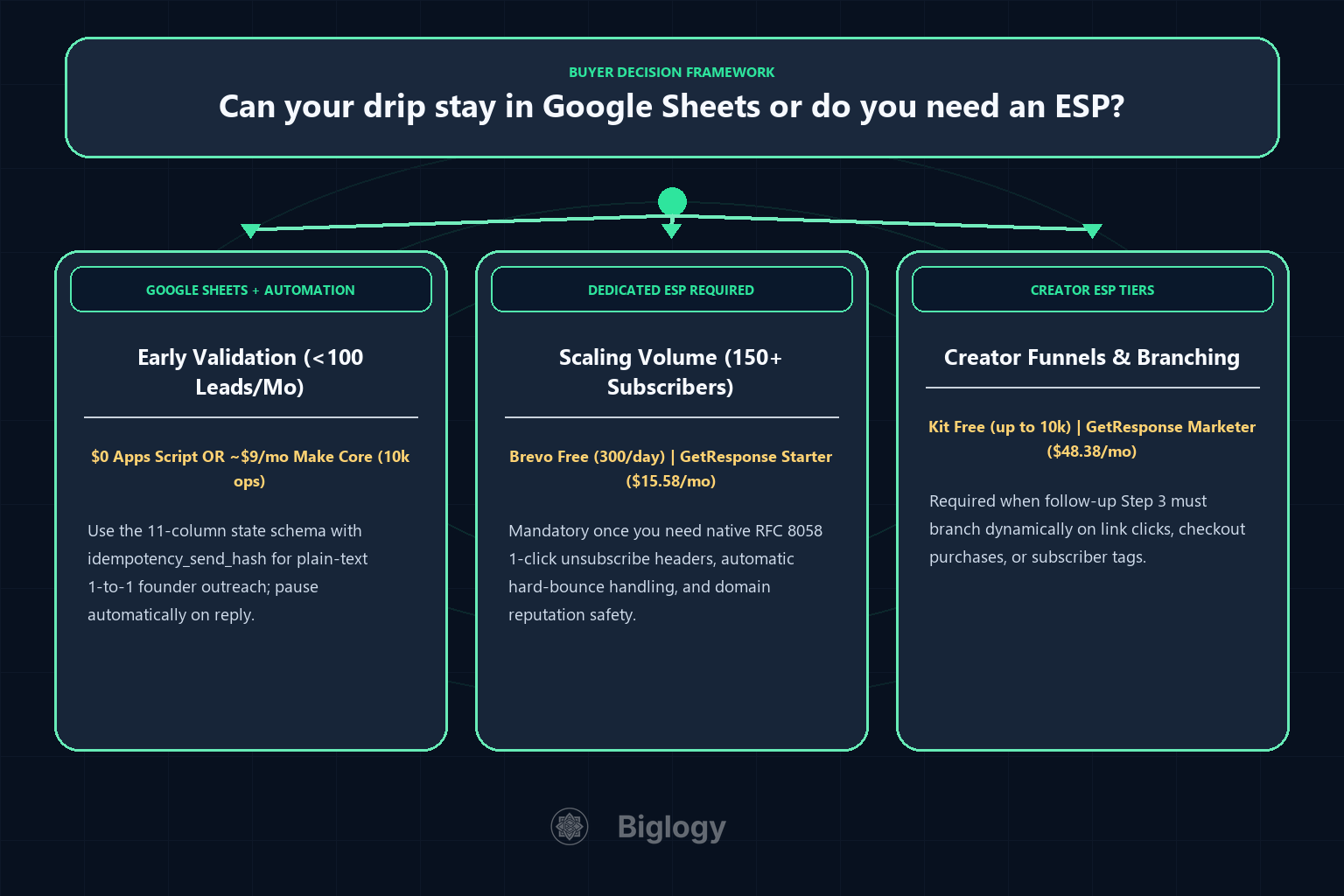
A Google Sheets + automation drip works well for 10 to 100 active B2B or coaching leads per month receiving high-touch, plain-text onboarding emails via your Workspace inbox. It breaks down the moment you cross ~150+ subscribers, send marketing newsletters to @gmail.com consumer inboxes, need HTML design/click tracking, or require instant RFC 8058 one-click unsubscribe compliance. At that inflection point, migrating onto a dedicated ESP evaluated in our GetResponse vs Mailchimp comparison, Kit review, and GetResponse review becomes safer and cheaper.
1. The Production-Safe 11-Column Google Sheets Drip Schema
The fatal mistake in DIY sheet mailers is missing state columns—resulting in sending Email #1 twice when a scheduled scenario runs again tomorrow. Set up Sheet Tab 1 (named drip_leads) with these exact 11 headers in Row 1:
| Column | Header Name | Example Value | Why This Column Is Non-Negotiable |
|---|---|---|---|
A | lead_id | LD-2026-0041 | Stable unique key preventing row-shift corruption if rows are sorted. |
B | email | [email protected] | Lowercased, trimmed primary identifier for duplicate blocking. |
C | first_name | Alex | Used for natural greeting personalization (with safe fallback like “there”). |
D | signup_timestamp_utc | 2026-11-17T10:15:00Z | Timestamp audit trail proving when opt-in originated. |
E | consent_source | tally_audit_checklist | Records exact form/page for GDPR & operational debugging. |
F | consent_flag | TRUE | Boolean guard: scenario filter halts immediately unless explicitly TRUE. |
G | current_stage | 0, 1, 2, 3 | Tracks last dispatched drip step (0 = queued for Day-0 welcome). |
H | last_sent_at | 2026-11-17T10:18:00Z | Timestamp written immediately after successful SMTP/Gmail dispatch. |
I | next_send_due_at | 2026-11-20T10:18:00Z | Exact UTC timestamp when the next stage becomes eligible to trigger. |
J | status | active / unsubscribed / bounced / completed | Single master kill-switch. Replies requesting removal flip this to unsubscribed instantly. |
K | idempotency_send_hash | sha256(email+stage) | Hard race-condition guard checked before sending so overlap runs never duplicate sends. |
Put your actual email subjects and body templates into Sheet Tab 2 (drip_templates) keyed by stage_number (1, 2, 3) and delay_days_after_prev (0, 3, 4). That keeps copy edits isolated cleanly in text cells rather than buried inside Make or Zapier modules.
2. The 3-Stage Architecture: Capture + Scheduled Drip Engine
Never run a continuous Sleep(3 days) delay inside an automation workflow for lead drips; long-running execution timers fail silently if scenarios update and can’t respect unsubscribes mid-sleep. Instead, use two decoupled, stateless micro-workflows:
Workflow 1: Real-Time Lead Capture & Deduplication
- Trigger: Instant Webhook from your website form (Tally, Typeform, WordPress Fluent Forms, or HubSpot form).
- Normalize & Validate: Trim whitespace, lowercase
email, reject disposable domains or empty fields. - Duplicate Lookup: Search Column B (
email) in Google Sheets. If a matching row already exists with statusactive,unsubscribed, orcompleted, update timestamp/notes ONLY—do not resetcurrent_stageback to0unless appropriate, and never re-subscribe anunsubscribeduser. - Append New Row: Write
current_stage = 0,status = active,next_send_due_at = NOW()so Stage 1 picks it up on the next run (or send Day-0 immediately and setcurrent_stage = 1+next_send_due_at = NOW() + 3 days).
Workflow 2: Hourly Scheduled Drip Dispatcher + Kill-Switch Filter
Run a scheduled check once every 60 minutes (consuming minimal operations when paired with a targeted Google Sheets filter query) using this exact eligibility filter:
ELIGIBLE IF:
  status == "active"
  AND consent_flag == TRUE
  AND current_stage < 3
AND next_send_due_at <= CURRENT_UTC_TIMESTAMP- Step A — Router by Next Stage: Determine
target_stage = current_stage + 1and look up the matching Subject & Plain-Text Body indrip_templates. - Step B — Idempotency Check & Send: Verify
idempotency_send_hash != hash(email + target_stage), then dispatch via Gmail/Google Workspace module with an explicit plain-text opt-out instruction in the footer. - Step C — Atomic Row Update: Immediately update
current_stage = target_stage,last_sent_at = NOW(),idempotency_send_hash = hash, and either setnext_send_due_at = NOW() + delay_daysor markstatus = completediftarget_stage == 3. - Bonus Operational Safeguard — Auto-Stop on Reply: Add a lightweight Gmail trigger watching incoming replies whose thread ID matches your drip sends; if the lead replies with a question (or “unsubscribe”), flip
statusfromactivetoreplied_pausedorunsubscribedautomatically so an awkward follow-up pitch never fires mid-conversation.
3. Google Sheets / Make / Apps Script Cost vs. Real ESP Math
| Architecture Option | 2026 Monthly Software Cost | Key Operational Ceiling | Best Fit Scenario |
|---|---|---|---|
| Google Apps Script + Gmail | $0/mo (inside existing Workspace) | Apps Script consumer limit (~100/day free Gmail; ~1,500/day Workspace quotas); zero bounce dashboard; breaks if script hits 6-min execution timeout. | Technical solo founder emailing <40 leads/week strictly 1-to-1 style. |
| Google Sheets + Make.com Core | ~$9–$10.59/mo (10k credits) | Watch polling operations! Hourly search consumes ~720 checks/mo; still capped by Gmail sending rules and manual unsubscribe tracking. | Teams already running Make who need CRM rows + Slack pings alongside light outreach. |
| Brevo Free / Starter | $0/mo (300/day) → $9/mo | Includes native RFC 8058 unsubscribe headers, bounce suppression, DKIM/DMARC wizard, and HTML analytics. | Any list crossing ~100+ leads or sending marketing broadcasts. |
| GetResponse / Kit Free Tiers | $0/mo (500–10k contacts limits) | Built-in double opt-in compliance, landing pages, visual automation, and clean segmentation. | Creators selling newsletters, lead magnets, or digital products. |
4. Six Hard Deliverability & Compliance Limits That Force an ESP Upgrade
Even if your automation runs flawlessly, spreadsheet mailers do not bypass mailbox provider rules. Plan your transition onto a dedicated ESP evaluated in our guide on when you need an email marketing system as soon as any of these six thresholds appear:
- 1. Primary Domain Reputation Risk: Sending automated campaigns from your main corporate Google Workspace domain means if 3 recipients hit “Report Spam” (crossing the 0.30% hard limit), even your one-on-one client invoices and calendar invites can start landing in Spam.
- 2. Missing Native
RFC 8058One-Click Unsubscribe Headers: Standard Zapier/Make Gmail connectors do not inject machine-readableList-Unsubscribe-Post: List-Unsubscribe=One-ClickHTTP headers required by Gmail and Yahoo for recurring promotional volume. - 3. No Automatic Soft/Hard Bounce Suppression: If a lead types a typo (
[email protected]), your spreadsheet keeps advancingcurrent_stageunless you parse asynchronous Gmail Delivery Subsystem bounce messages. - 4. Workspace Per-User Rate Caps: Google Workspace enforces a rolling 24-hour cap (2,000 total messages/day, lower for newly provisioned domains), and automated burst loops triggered simultaneously can temporarily lock outbound SMTP for 24 hours.
- 5. Zero Link-Click or Behavioral Branching: Google Sheets cannot branch follow-up Email #3 automatically based on whether a prospect clicked your pricing link in Email #2.
- 6. GDPR Data Minimization & Access Control: Sharing a raw Google Sheet across contractors exposes every lead’s PII in plain sight instead of enforcing role-based ESP permissions.
Want a clean visual blueprint of how landing-page forms connect safely into CRMs and email steps? Read our step-by-step framework on visual Make workflow orchestration and test plan ceilings carefully using our 20-item software trial checklist.
Official Sources & Documentation Reviewed (2026)
- Google Workspace Email Sending Limits Documentation: https://support.google.com/a/answer/166852
- Google Apps Script Quotas for MailApp / GmailApp: https://developers.google.com/apps-script/guides/services/quotas
- Brevo & GetResponse Official Free Tier Specifications: Brevo Pricing and GetResponse Pricing
Related posts:
 Brevo Review (2026): Is Per-Email Pricing Better Than List-Size Billing?
 Mailchimp to GetResponse Migration Checklist: How to Switch Without Losing Consent or Deliverability (2026)
 GetResponse vs Mailchimp for Creators: 2026 Email Automation and Pricing Comparison
 GetResponse Review for Digital Product Creators: Email, Forms, and Automation

Leave a Reply
Want to join the discussion?Feel free to contribute!