

Zapier Review (2026): Is 7,000+ App Connectivity Worth the Task Pricing?
Editorial Disclosure: Biglogy preserves strict reader-first editorial independence. This evaluation is grounded in verified 2026 vendor documentation, pricing schedules, and task-counting rules rather than sponsored rankings. Notice that links to Zapier point directly to its official portal with no active affiliate token, while links to alternative Make.com (/go/make/) include an active partner referral link marked rel="nofollow sponsored" from which Biglogy may earn a commission at no extra cost to you. Always verify checkout terms directly.
For over a decade, Zapier has been the default connective tissue of small-business SaaS stacks. Whenever two cloud tools lack a native integration—connecting a Webflow lead form to HubSpot, posting Stripe purchases into Slack, or syncing Google Sheets rows with an email list—Zapier almost always supports both apps out of the box. In 2026, Zapier boasts over 7,000+ app integrations alongside built-in Tables, Interfaces, Chatbots, and AI Copilot orchestration.
Yet ubiquity comes with a well-known catch: Zapier bills per executed task, and multi-step workflows scaling into thousands of events per month can make monthly software invoices balloon unpredictably. Is Zapier still the best automation tool for small businesses in 2026, or should cost-conscious operators choose Make or n8n instead?
Short Answer: Should You Use Zapier in 2026?
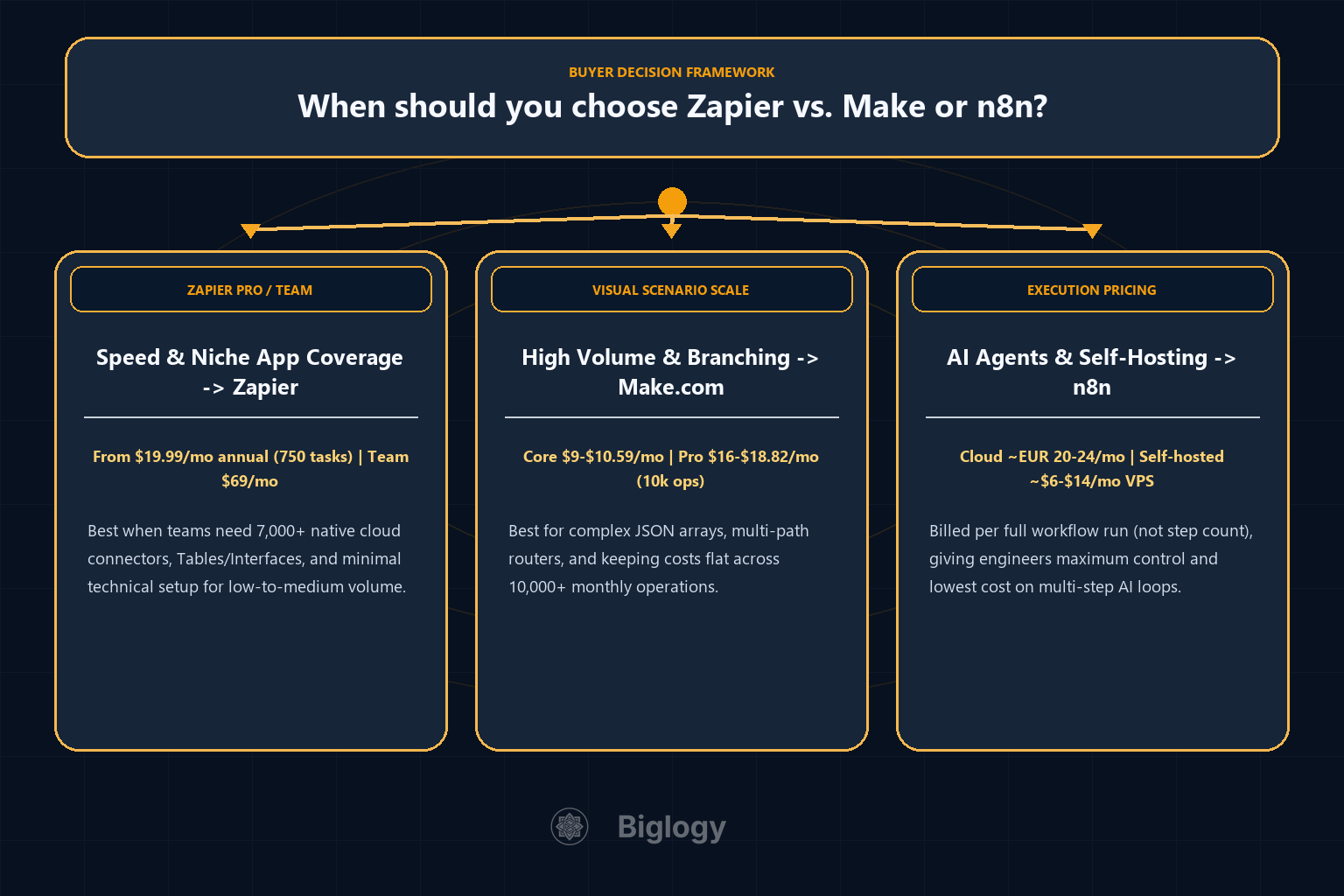
Choose Zapier if your team prioritizes zero-friction setup speed, maximum app coverage (especially niche B2B SaaS tools missing elsewhere), and non-technical reliability for low-to-moderate workflow volumes.
Look elsewhere if your automations involve heavy data transformations, complex branching loops, JSON payload arrays, or high monthly volume (10,000+ operations/month). In those scenarios, Zapier’s per-task bill scales steeply compared to visual scenario tools reviewed in our Make.com review and our head-to-head Make.com vs Zapier comparison.
Zapier at a Glance: 2026 Capabilities
| Platform Area | Zapier 2026 Feature Set | Practical Impact for SMBs |
|---|---|---|
| App Ecosystem | 7,000+ native cloud integrations | Virtually guarantees obscure CRMs, forms, and billing tools connect natively. |
| Workflow Canvas | Linear builder + Paths branching + Zapier Copilot AI | Fastest setup for non-developers; English prompts generate starter Zaps cleanly. |
| Zapier Tables & Interfaces | Native no-code databases and front-end mini-apps | Eliminates needing Airtable or external form wrappers for simple internal portals. |
| Data Logic Tools | Built-in Formatters, Filters, Delays, Webhooks, Code (JS/Py) | Strong utility library, though webhooks and multi-step logic require paid plans. |
| Error Handling | Auto-replay retries, held-task queues, alert notifications | Reliable enterprise monitoring—reduces silent form submission drops. |
| Pricing Unit | Billed per successfully executed action (“Task”) | Easy to start cheaply, but linear scaling makes high-volume loops pricey. |
Where Zapier Truly Wins—and Where It Struggles
1. Unbeatable App Directory and Maintenance Relief
Time saved often dwarfs software fees. When a founder needs a quick bridge between Calendly, Stripe, Slack, and Google Workspace, Zapier connects via simple OAuth sign-ins without managing API keys, JSON schemas, or webhook endpoint debugging. Moreover, because Zapier maintains vendor API upgrades proactively behind the scenes, small teams avoid the broken integrations common in DIY scripts.
2. Zapier Tables, Interfaces, and AI Copilot
Instead of acting solely as invisible glue, Zapier has expanded into lightweight app building. Zapier Tables stores structured lead and operations records directly inside Zapier, while Interfaces turns forms, approval queues, and client dashboards into shareable web pages—all usable even on Free tiers for simple workflows. Combined with Zapier Copilot (describing an automation in plain language to scaffold triggers and actions), beginner onboarding speed in 2026 is remarkably fast.
3. The Cost & Logic Wall on Complex Loops
Zapier’s weakness emerges as soon as workflows shift from simple 1-to-1 events to heavy batch operations:
- Linear Loop Cost: Looping over a 50-line invoice array and updating three apps per line consumes 150 tasks in seconds.
- AI Model Multipliers: Advanced AI steps or built-in model calls can carry higher task multipliers depending on configuration, draining base allowances rapidly.
- Pay-Per-Task Overages: If you leave overage billing enabled and a webhook triggers unexpectedly in a loop, monthly charges climb automatically; if disabled, incoming events sit in a held queue until you upgrade or wait for cycle reset.
Zapier Pricing Plans & Task Limits in 2026
Zapier’s three core self-serve plans scale by monthly task pools and team collaboration gates:
| Plan Tier | Starting Annual Price | Starting Monthly Price | Included Base Tasks | Critical Plan Limits & Gates |
|---|---|---|---|---|
| Free | $0 | $0 | 100 tasks / month | Strictly 2-step Zaps only (1 trigger + 1 action); 15-min polling; no multi-step, paths, or premium apps. |
| Professional | $19.99 / mo | $29.99 / mo | 750 tasks / month | Unlimited multi-step Zaps, Paths branching, webhooks, code steps, premium apps; 1-min/instant triggers; 1 user seat. |
| Team | $69 / mo | $103.50 / mo | 2,000 tasks / month | Up to 25 users, shared app connections, shared folders, SAML SSO, premier support. |
| Enterprise | Custom | Custom | Custom high volume | Admin permissions, audit logs, annual task pools, strict governance controls. |
Understanding How Zapier Counts Tasks
In Zapier’s billing documentation, triggers, filters (conditions that stop a run early), and standard built-in formatting utilities do not normally consume tasks. Every successful action step—creating a CRM contact, updating a spreadsheet row, sending a Slack ping—consumes 1 task. That sounds fair until you build a 6-step onboarding Zap: running it for just 150 customers per month burns 750+ tasks, immediately forcing a higher tier upgrade.
Zapier vs. Make vs. n8n: Which Fits Your Budget?
| Evaluation Factor | Zapier | Make.com | n8n (Cloud / Self-Hosted) |
|---|---|---|---|
| Best For | Fast non-technical SaaS bridges & niche integrations | Visual branching, JSON payloads, affordable scale | Developer workflows, AI agents, strict data self-hosting |
| Cost at High Volume | Expensive above 10,000 tasks/month | Dramatically cheaper per operation/credit | Lowest unit cost on self-hosted servers (requires DevOps) |
| Visual Debugging | Step-by-step run history list | Visual node execution trace & data inspector | Full node execution trace + custom JS/Python editing |
Before locking your company onto any workflow engine, compare deployment tradeoffs in our Make.com vs n8n comparison and walk through our Small Business Workflow Automation Buyer’s Guide.
Pros and Cons Summary
| Zapier Strengths | Zapier Tradeoffs |
|---|---|
| Largest native cloud app ecosystem (7,000+ verified connectors). | Free plan’s 2-step limit and 100-task cap restrict real business testing. |
| Minimal technical barrier; AI Copilot speeds up workflow assembly. | High per-task cost for multi-step loops and heavy CRM sync jobs. |
| Tables & Interfaces extend utility into simple internal tools. | Team sharing and SAML SSO locked behind the $69–$103.50/mo Team tier. |
| Strong reliability, held-task replay queue, and vendor-maintained APIs. | Less visual transparency on nested arrays than Make or n8n. |
Verdict: Who Should Choose Zapier?
Zapier remains the safest, fastest default choice for lean teams and non-technical operators running focused, low-to-moderate volume automations across specialized SaaS apps. If ease of maintenance and broad connector availability matter more to your bottom line than squeezing every penny out of API execution costs, Zapier Professional delivers immediate value. Conversely, if your operation processes tens of thousands of webhook payloads monthly or relies on intricate visual routing, test Make or n8n first before your task bill outgrows your budget.
Official Sources & Documentation Reviewed
- Zapier Official Homepage
- Zapier Official Pricing & Task Tiers
- Zapier Help Center: How Tasks & Usage Are Measured
Review updated: November 16, 2026. Task multipliers, AI credit rules, and monthly pricing tiers can change; confirm current rates on Zapier’s official portal prior to committing.


Leave a Reply
Want to join the discussion?Feel free to contribute!