

How to Escape SaaS Vendor Lock-In: Exporting Contacts, History, and Media Safely
Quick data rescue rule: Never click ‘Cancel Subscription’ inside a SaaS billing portal until you have verified the integrity of a complete local offline backup. Vendors routinely terminate workspace access, revoke API tokens, and purge hosted media assets immediately upon cancellation. Enforce a 3-stage export protocol: relational tables first (CSV/JSON), hosted file attachments and media second, and billing/compliance receipts third.
Vendor lock-in is rarely a legal contract—it is an architectural barrier where importing takes one click, while exporting gives you a flattened CSV with missing media and stripped relational IDs.
The Lock-In Reality: How Closed Platforms Hold Business Data Hostage
Modern SaaS platforms build powerful moats around customer data. While signup forms offer effortless one-click imports from competitors, their export menus are often buried three levels deep under account settings, restricted to weekly export quotas, or stripped of crucial relational metadata like note author timestamps, deal stage history, and hosted document attachments. Under GDPR Article 20 (Right to Data Portability), business users and consumers possess legal rights to receive personal data in a structured, commonly used, and machine-readable format—yet exercising that right requires methodical technical preparation.
Four Common Data Loss Traps During Platform Migration
- Flattened multi-select fields: Exporting custom tags or multi-select dropdowns as semi-colon-separated strings that break relational imports in your new tool.
- Dead asset links: Image and PDF URLs pointing to the old vendor’s Amazon S3 bucket that return HTTP 403 Access Denied the moment your subscription expires.
- Stripped communication history: Exporting contact emails while leaving years of customer support tickets, email threads, and meeting notes locked behind proprietary APIs.
- Lost consent timestamps: Forgetting to export original opt-in dates, IP addresses, and lead source URLs needed to defend against spam complaints under privacy regulations.
SaaS Data Rescue Diagnostic & Export Priority
Follow the structured extraction order below before notifying your current vendor of contract termination.
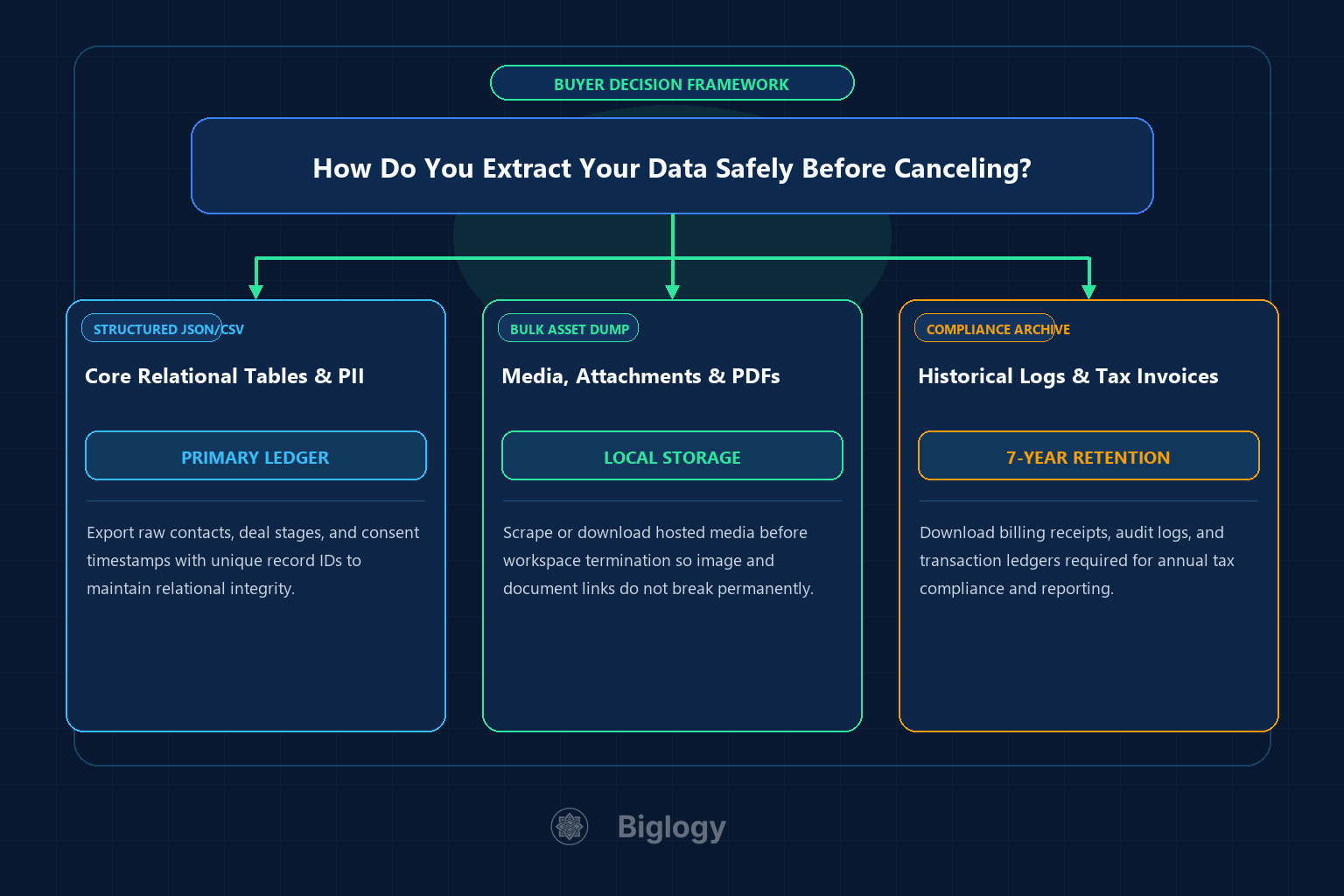
No-Tool First Step: The 4-Stage Pre-Cancellation Extraction Protocol
- Stage 1: Generate Full Workspace Entity Exports: Navigate to Admin -> Settings -> Data Management. Trigger full raw CSV or JSON exports of all primary objects (Contacts, Accounts, Deals, Products, Invoices). Save these with ISO date-stamped folder names.
- Stage 2: Bulk Download Hosted Media and File Attachments: Never rely on exported CDN links. Use a lightweight batch script or browser extension to download all linked customer agreements, avatars, and invoices locally.
- Stage 3: Extract API Keys & Webhook Dependencies: Inventory every active integration in Zapier, Make, or native webhooks using this platform’s API keys before revoking permissions.
- Stage 4: Download 24 Months of Paid Invoices: Accounting departments frequently lose access to historical billing statements needed for tax audits once user accounts are closed.
Copyable Python Script for Validating Exported CSV Attachments
Run this simple script on your local machine to verify that image and file URLs in your exported CSV are publicly downloadable before closing your account:
# verify_export_attachments.py
import csv, urllib.request, sys
from pathlib import Path

csv_file = Path("contacts_export.csv")
url_column = "Attachment_URL"

with open(csv_file, encoding="utf-8-sig") as f:
    reader = csv.DictReader(f)
    urls = [row[url_column] for row in reader if row.get(url_column)]

print(f"Checking {len(urls)} attachment URLs...")
broken = 0
for u in urls[:50]:  # Sample test first 50
    try:
        req = urllib.request.Request(u, headers={"User-Agent": "Mozilla/5.0"})
        with urllib.request.urlopen(req, timeout=10) as resp:
            if resp.status != 200:
                print(f"Broken: {u} (Status {resp.status})")
                broken += 1
    except Exception as e:
        print(f"Error {u}: {e}")
        broken += 1

print(f"Check Complete. Broken links: {broken}")
SaaS Migration & Interoperability Playbooks
Once raw data is secured locally, mapping schemas into destination tools requires strict field reconciliation. Review our dedicated guides on email platform migration without losing consent and moving student video and course data safely to plan your transition smoothly. At Biglogy, we advocate for open standards, data sovereignty, and transparent exit terms across all software reviews.
Frequently Asked Questions
Can a SaaS provider legally refuse to give me my data upon cancellation?
Under regulations such as GDPR and CCPA, businesses and individuals have legal rights to access and export their personal data. However, proprietary derived data (such as proprietary lead scores or vendor algorithms) is often excluded under service terms.
What is the difference between an API export and a CSV backup?
CSV exports provide flattened snapshot tables suitable for spreadsheets, while API exports preserve nested relational structures (like thread comments, activity history, and parent-child record links).
How long do SaaS providers typically retain data after account closure?
Retention varies widely: some delete data immediately upon billing cycle termination, while others retain backups for 30 to 90 days in compliance with their privacy policy before permanent purging.
Should I downgrade to a free tier instead of canceling immediately?
Yes, whenever a free tier exists. Downgrading to free retains your workspace shell, preserves read-only access to historical records, and prevents sudden URL breakage while you finalize your new setup.
What should I do if my export file is too large to download?
Contact vendor enterprise support to request an asynchronous S3 bucket dump or partition your export by date ranges (e.g., quarterly) to avoid browser timeout crashes.
Editorial transparency: This technical guide is independently authored without commercial sponsorship or paid vendor placements. Read our complete standards in our Publishing Charter.


Leave a Reply
Want to join the discussion?Feel free to contribute!