
Online Course Platform Migration Checklist: Moving Video, Students, and Subscriptions Safely (2026)
Editorial & Student-Data Disclosure: Biglogy creates independent software operations guides backed by 2026 LMS export documentation, Stripe billing portability rules, and GDPR/student data protection principles. Links to LearnWorlds (/go/learnworlds/) route through Biglogy’s neutral directory without paid affiliate sponsorship, while links to systeme.io (/go/systeme-io/) carry an active partner tracking link (rel="nofollow sponsored"). Never terminate legacy course billing until dual-platform verification passes.
Outgrowing your first online course platform happens fast: maybe Starter plan transaction fees (such as fixed $5/enrollment charges or 5%–8% commission tiers) started eating hundreds of dollars per month, or you finally need SCORM compliance, interactive video transcripts, and an integrated sales funnel. Yet switching LMS platforms (across Thinkific, LearnWorlds, Podia, Kajabi, or Teachable) carries far higher risk than migrating a static blog.
Why? Because you aren’t just moving HTML pages—you are moving gigabytes of proprietary video encoding, graded quiz histories, active monthly recurring Stripe subscriptions, and hundreds of student logins. Done sloppily, forced password resets trigger 15%–30% support ticket spikes and accidental subscription cancellations. Follow this 5-phase operational checklist to migrate safely with zero lost enrollments or broken cash flow.
Short Answer: What Breaks Most Course Platform Migrations?
Three silent failure points derail 80% of LMS moves: (1) failing to keep raw local MP4/caption masters (many platforms disable bulk video download or strip quiz metadata), (2) trying to move recurring payments away from a Merchant-of-Record gateway (forcing students to re-enter credit cards manually), and (3) bulk-enrolling old alumni with generic welcome emails enabled, confusing inactive buyers. Weighing target features first in our Thinkific vs. LearnWorlds vs. Podia comparison and 25 pre-purchase course platform questions ensures you only migrate once.
Phase 1: Curriculum & Master Asset Inventory (4 Weeks Before Switch)
Under SaaS data portability best practices, treat any cloud LMS as a temporary showcase—never your sole archive of intellectual property.
- Raw Video & Caption Audit: Confirm you hold local 1080p MP4 masters and
.srt/.vttsubtitle tracks for every lesson. Export videos via vendor library tools immediately if missing, noting that proprietary platform wrappers strip interactive hotspots or chapters during export. - Downloads, PDFs & Workbooks: Collect every lesson attachment, Notion template, and spreadsheet download into a versioned folder mirroring Module/Lesson hierarchy.
- Quizzes, Assignments & Certificates: Export quiz question banks (CSV/Excel where supported, or copy manually) and screenshot certificate layouts, signature graphics, and pass-grade thresholds.
- SCORM / HTML5 Packages: Note which tiers support corporate standards—for instance, LearnWorlds unlocks SCORM packages starting on Pro Trainer (~$79/mo annual, 0% transaction fee), whereas funnel-first tools do not execute SCORM manifests natively.
Phase 2: Student Profiles, Completion History & Privacy Preservation
Do not simply dump every student email into an “All Enrolled” CSV. Export full enrollment ledgers with timestamp proof so completion status and cohort pricing tiers remain intact:
| Data Field Required | Why You Must Preserve It | Destination Handling Tip |
|---|---|---|
student_email + full_name | Primary account matching key across Stripe & LMS login. | Clean casing/whitespace; handle students enrolled across multiple bundles without duplicate user IDs. |
course_id + bundle_tier | Prevents accidentally unlocking paid flagship courses for free lead-magnet signups. | Create matching product tags or bundles on the target platform BEFORE bulk importing users. |
enrollment_date + completion_pct | Supports drip timers (e.g., Week 4 unlocks 28 days post-signup) and certificate fairness. | Use API or migration concierge support if preserving lesson-by-lesson percentage completion is mandatory. |
marketing_optin_status | GDPR/CAN-SPAM separation between transactional students vs. promotional newsletter opt-ins. | Never auto-opt students into marketing broadcasts during LMS account import. |
Phase 3: Billing & Recurring Subscription Continuity (The Riskiest Step)
This single technical check decides whether your recurring membership revenue transfers seamlessly or faces forced churn:
| Current Setup → New Setup | Card Token Portability | Recommended Transition Strategy |
|---|---|---|
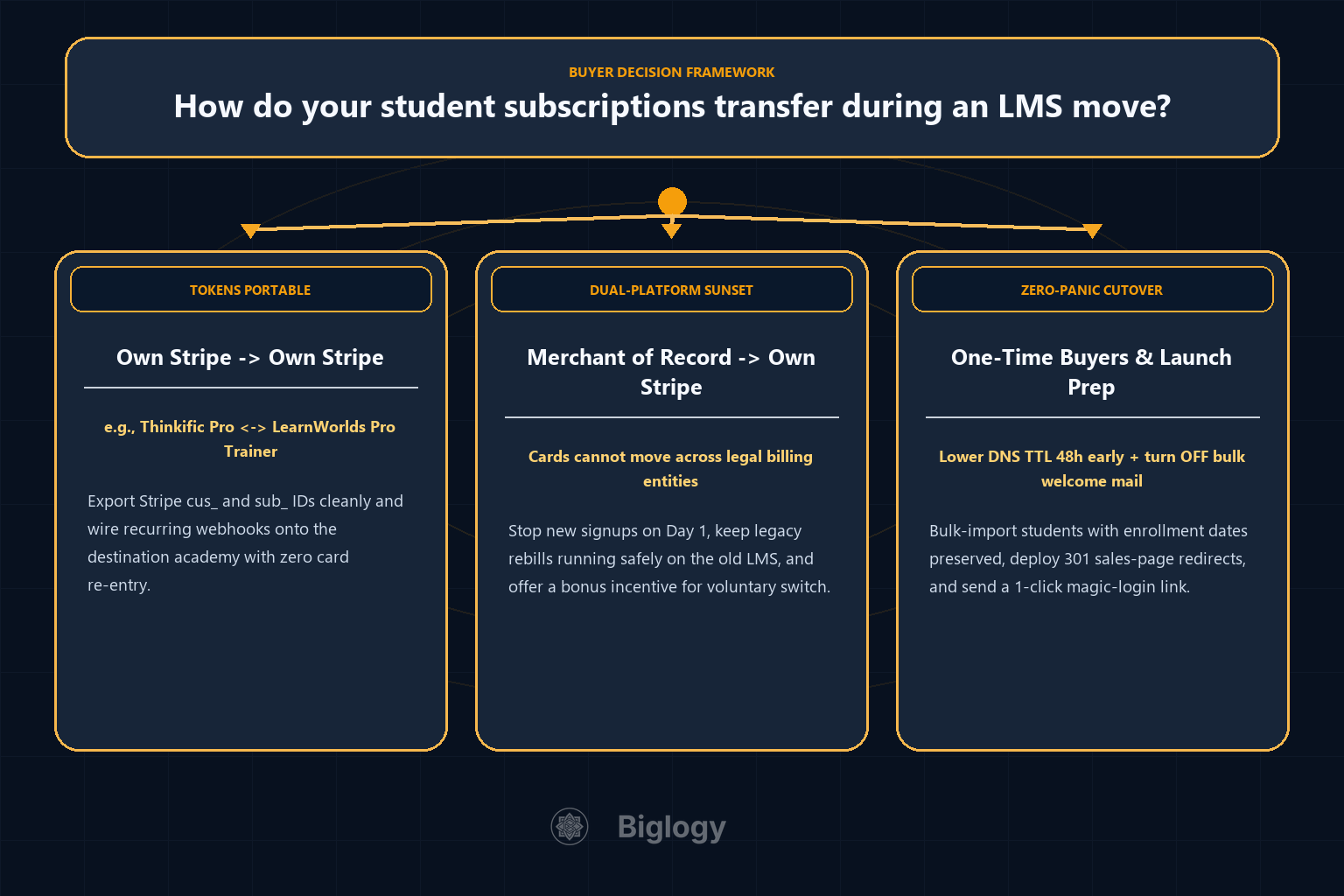
| Same Own Stripe Account → Own Stripe Account (e.g., Thinkific Pro ↔ LearnWorlds Pro Trainer) | Portable! Tokens sit inside your Stripe Dashboard. | Export Stripe Customer IDs (`cus_…`) and Subscription IDs (`sub_…`); map existing payment hooks onto the new LMS webhook endpoint during low-traffic cutover. |
| Merchant of Record (MoR) → Own Stripe (e.g., Teachable BackOffice → systeme.io or LearnWorlds) | NOT Portable! Cards belong to the vendor’s Stripe/MoR entity. | Run a Dual-Platform Sunset: halt NEW signups on old LMS Day 1, honor existing active subscriptions inside old LMS while offering seamless Stripe re-billing incentives (bonus module / price-lock) to migrate willingly. |
| One-Time Course Buyers Only | 100% Simple! Zero ongoing rebills. | Disable welcome automation emails on destination LMS, bulk enroll paid alumni cleanly, and send one clear onboarding announcement. |
Phase 4: When Transaction-Fee Savings Pay Back Migration Effort
Worried migration takes 10 hours of tedious setup? Calculate the fee payback window first. Suppose you average 40 course sales per month at $149 ($5,960 monthly revenue):
- On LearnWorlds Starter (~$44/mo annual + $5 fee per sale), fees add
$44 + (40 × $5) = $244/month. Upgrading cleanly to Pro Trainer (~$79/mo annual, 0% fee) or evaluating alternatives in our systeme.io vs. Kajabi guide saves $165/month ($1,980/year)—paying back migration within ~30–60 days. - Even moving from a 5% commission plan ($298/month fees at $5,960 sales) into a flat 0%-fee plan captures over $2,400+ annually cleanly.
Phase 5: Cutover DNS, 301 Redirects & Zero-Panic Student Onboarding
- Disable Automated Bulk-Import Welcome Emails First: Triple-check notification toggles before clicking Import CSV so students do not receive 4 separate course emails at 3:00 AM.
- Map Every Old Sales URL with 301 Redirects: If moving from
academy.yourdomain.com/courses/seo-bootcampto a new slug structure, publish 301 redirects (via Cloudflare Rules or WordPress Redirection) so backlinks, YouTube video descriptions, and email links never hit 404 errors. - DNS TTL Reduction 48 Hours Early: Lower CNAME TTL to 300 seconds on your academy subdomain before updating DNS pointing toward the new LMS host so SSL provisioning completes quickly.
- Send a Plain-English Access Guide (3-Touch Sequence): Notify students 7 days before, on Cutover Day (with an exact 1-click “Set Your Password / Magic Login” link matching their registered email), and 72 hours after—dramatically slashing support panic.
- Keep Legacy Account Active Read-Only for 30 Days: Audit checkout flows, certificate PDFs, and drip email sequences against our digital product checkout delivery standard and 20-item trial test checklist before terminating the old subscription.
Phase 6: 7-Day Parallel Verification & Rollback Runbook
Before canceling your previous LMS plan—even after students start logging into the new portal—verify these five live production checks in a staging/test-student account using a real 100%-off test coupon or $1 live card transaction:
| Live Verification Test | Pass Criterion | Rollback / Fix Trigger |
|---|---|---|
| New Student Checkout + Tax Receipt | Payment clears, VAT/tax calculates correctly, buyer lands directly inside enrolled course dashboard within 10 seconds. | Re-point public buy buttons temporarily back to old checkout until webhook or Stripe API keys are repaired. |
| Video & Interactive Lesson Playback | Desktop Chrome, iOS Safari, and Android Chrome stream 1080p HLS cleanly with synced captions and downloadable PDFs. | Re-upload corrupted MP4 encoding or verify Vimeo/Bunny CDN domain whitelist rules. |
| Post-Purchase Email Webhook Sync | Make.com or ESP tag (e.g., customer_flagship_course) fires automatically upon purchase. | Verify updated webhook secret inside GetResponse, Kit, or Zapier. |
| Course Drip & Quiz Unlock Logic | Module 2 unlocks properly only after Quiz 1 score passes required threshold. | Reset prerequisite lock settings before Day-1 cohort reaches Lesson 2. |
| Student Self-Serve Invoice & Cancel Flow | Recurring members can download billing receipts and update expiring cards cleanly without emailing support. | Confirm customer portal URL matches active Stripe customer portal configuration. |
Frequently Asked Course Migration Questions
Do student community discussions and comments migrate cleanly?
Usually no. Most course platforms do not provide threaded CSV export/import for student forum posts or timestamps under original learner profiles. Treat historical Q&A threads honestly: archive the best questions into a curated FAQ lesson PDF inside the new academy rather than promising broken forum history.
What happens to affiliate partners promoting my old course links?
If your old LMS hosted an internal affiliate tracker (for example, ?ref=partner12 URLs), parameter formats almost always change during migration. Notify top partners 14 days before switching, issue updated tracking links on your destination platform (or via standalone WordPress redirect management), and honor attribution manually during a 30-day overlap window so active promoters do not lose commissions.
Official Sources & Documentation Reviewed (2026)
- LearnWorlds Migration, Pricing & SCORM Help Center: https://www.learnworlds.com/pricing/ and LearnWorlds Support Center
- Thinkific Course & Stripe Subscription Data Export Documentation: Thinkific Help Center
- systeme.io Course & Funnel Pricing Plans (0% Transaction Fee): https://systeme.io/pricing
Related posts:
 LearnWorlds Review (2026): Is It the Best Course Platform for Serious Educators?
 Thinkific vs LearnWorlds vs Podia: 2026 3-Way Online Course Platform Comparison
 systeme.io Review for Digital Product Sellers: 2026 Funnels, Email, and Course Hosting Reality
 systeme.io vs Kajabi for Course Creators: 2026 Platform and Pricing Comparison


Trackbacks & Pingbacks
[…] reconciliation. Review our dedicated guides on email platform migration without losing consent and moving student video and course data safely to plan your transition smoothly. At Biglogy, we advocate for open standards, data sovereignty, and […]
[…] Online Course Platform Migration Checklist (Video, Students & Subscriptions) […]
Leave a Reply
Want to join the discussion?Feel free to contribute!