

Mailchimp to GetResponse Migration Checklist: How to Switch Without Losing Consent or Deliverability (2026)
Editorial & Compliance Disclosure: Biglogy maintains strict editorial independence. This technical migration runbook is compiled from official 2026 Mailchimp export schemas, GetResponse import rules, GDPR Article 7/Article 20 portability requirements, and mailbox provider authentication guidelines (SPF/DKIM/DMARC/RFC 8058). Links to GetResponse (/go/getresponse/) route through Biglogy’s neutral portal directory without an active paid affiliate token. Never perform production list migrations without taking immutable CSV backups first.
Switching email marketing platforms mid-flight feels deceptively easy—export one CSV, upload it into the new provider, and start sending—until half your newsletters vanish into Gmail spam folders or your automation accidentally blasts 800 users who unsubscribed two years ago. As more creators and small businesses leave Mailchimp over shrinking Free tier ceilings (capped at 250 contacts and 500 monthly sends in 2026) and Audience contact-counting rules that charge for unsubscribed or dormant records, GetResponse has become a top destination for predictable list pricing, unlimited sends, and built-in funnel/course tools.
Before pressing export, review our head-to-head GetResponse vs Mailchimp comparison and detailed GetResponse review for digital creators to confirm the switch fits your stack. Then follow this 5-phase operational checklist to migrate cleanly without breaking GDPR consent audit trails, Zapier/Make webhooks, or sender domain reputation.
Short Answer: The Golden Rule of ESP Migration
Never migrate everyone into a single flat list and blast a “We moved!” announcement on Day 1. Instead, you must (1) separate active, unsubscribed, and cleaned contacts into distinct exports, (2) preserve opt-in timestamps and IP metadata under GDPR/CCPA accountability rules, (3) authenticate DNS records (SPF, 2048-bit DKIM, DMARC) before uploading a single email, and (4) warm up GetResponse delivery across 14 days by sending first to your most engaged 30-day openers.
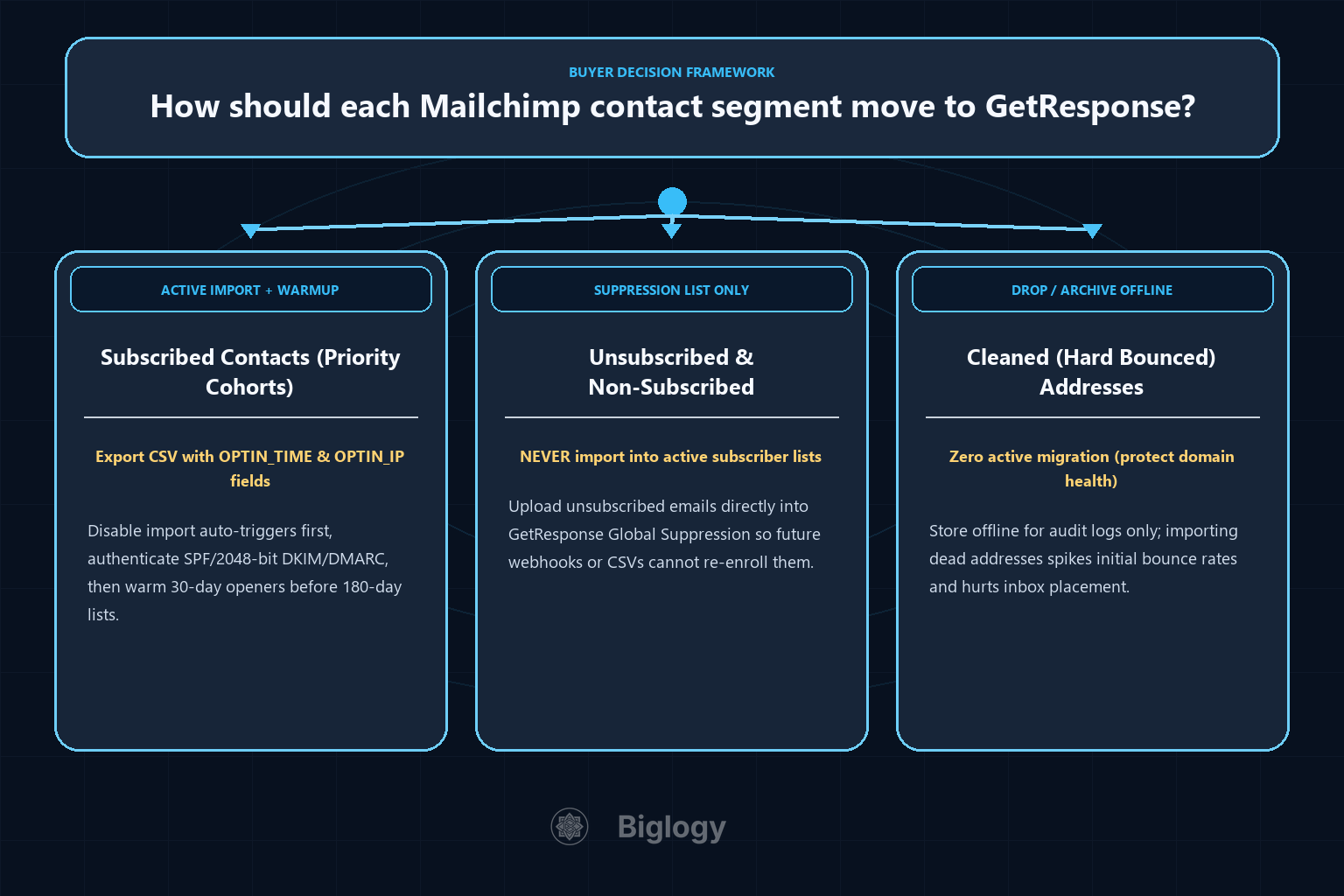
Phase 1: Pre-Migration Data Audit & Separation (Do Not Merge Lists)
Mailchimp stores every Audience contact in one of four compliance states: Subscribed, Unsubscribed, Non-Subscribed (transactional/E-commerce-only contacts with no marketing opt-in), and Cleaned (hard-bounced). Mixing these buckets in one CSV creates immediate legal liability under CAN-SPAM and GDPR.
| Mailchimp Contact Segment | Should You Migrate It? | How to Map Inside GetResponse |
|---|---|---|
| Subscribed (Engaged ≤ 180 days) | Yes — Priority Cohort | Import into primary GetResponse list with original OPTIN_TIME, OPTIN_IP, tags, and segments. |
| Subscribed (Unengaged > 180 days) | Optional / Quarantine | Tag as legacy_cold; exclude from initial 14-day domain warm-up sends or run a single sunset re-engagement pass later. |
| Unsubscribed | Suppression List ONLY | Export separately and upload directly into GetResponse’s Account Suppression List—NEVER as active subscribers. |
| Cleaned (Hard Bounced) | No — Drop Completely | Delete or store offline in encrypted archive. Uploading dead addresses spikes initial bounce rates and throttles IP reputation. |
| Non-Subscribed | Do Not Mail | Leave out of promotional lists unless you collect explicit opt-in consent separately. |
Why keep unsubscribed emails in a suppression list rather than deleting them? Because if an old CSV, CRM webhook, or Zapier sync accidentally pushes that email address back into GetResponse later, an active global suppression rule blocks accidental re-enrollment automatically. For broader vendor-exit planning, read our guide on why data portability matters when switching SaaS platforms.
Phase 2: Preserving Legal Opt-In Proof & Merge Tags
When exporting your Mailchimp Audience CSV (Mailchimp compresses separate files named subscribed_members_export_*.csv, unsubscribed_members_export_*.csv, etc.), verify that you retain critical provenance columns before deleting your Mailchimp workspace:
- Mandatory Compliance Fields: Keep
OPTIN_TIME,OPTIN_IP,CONFIRM_TIME,CONFIRM_IP, andGDPR Marketing Permissionsinside GetResponse custom fields (e.g.,legacy_optin_date,consent_source). Note that under GDPR Article 7, the controller bears the burden of proving affirmative consent if audited. - CRITICAL Setting During CSV Import: When uploading migrated subscribers into GetResponse, select “I have permission to add these people to my list” only for genuine verified opt-ins, and make sure welcome/autoresponder triggers for API/CSV imports are DISABLED before uploading—otherwise GetResponse can fire Day-0 lead-magnet welcome sequences to thousands of existing subscribers simultaneously.
- Merge Tag Syntax Translation: Audit all migrated copy for broken Mailchimp merge tags before launching campaigns:
| Token Purpose | Mailchimp Merge Tag | GetResponse Dynamic Field |
|---|---|---|
| Subscriber First Name | *|FNAME|* (with conditional *|IF:FNAME|*) | [[firstname]] (or fallback setup inside custom fields) |
| Subscriber Email | *|EMAIL|* | [[email]] |
| Unsubscribe URL | *|UNSUB|* | Handled automatically in footer / [[remove]] tag |
| Web Version View | *|ARCHIVE|* | [[view]] |
Phase 3: Custom Domain Authentication (SPF, DKIM, DMARC) Before Sending
Since February 2024—and strictly enforced throughout 2026—Google and Yahoo require custom domain authentication and one-click unsubscribe headers for bulk senders. Sending from a default sharedESP domain or forgetting DKIM triggers soft bounces immediately.
- Add Custom Sending Domain Inside GetResponse: Set up a branded sending address like
[email protected]rather than a free@gmail.comaddress (which fails DMARC alignment). - Publish 2048-bit DKIM CNAME/TXT Records: Copy the DKIM hostname and value generated in GetResponse Domain Settings into Cloudflare or your DNS registrar and confirm green “Authenticated” status.
- Verify SPF Inclusion & DMARC Policy: Ensure your root DNS SPF TXT record does not exceed the hard 10-DNS-lookup limit, and publish at least
v=DMARC1; p=none; rua=mailto:[email protected];(graduating top=quarantineorp=rejectafter 30 days of clean reports). - One-Click Unsubscribe Compliance (RFC 8058): GetResponse natively injects compliant
List-Unsubscribe-Postheaders into broadcasts on properly authenticated custom domains.
Phase 4: Rebuilding Forms, Tags & Parallel Webhook Cutover
Do not wait until every email finishes importing to disconnect Mailchimp capture forms—or worse, cancel Mailchimp while live blog popups still point to Mailchimp API keys! Sequence your ingestion switch cleanly:
- Step 1 — Inventory Every Lead Source: Check WordPress footer forms, OptinMonster/Elementor widgets, WooCommerce/Stripe checkout webhooks, Make.com/Zapier scenarios, and Calendly integrations.
- Step 2 — Recreate Core Segments & Tags: GetResponse replaces Mailchimp Audience “Groups” and “Tags” with flexible cross-list Tags, Custom Fields, and dynamic Segments. Migrate customers into one clean master list separated by tags rather than duplicating contacts across 5 lists (GetResponse bills by unique subscriber count only when configured properly without duplicate cross-list storage).
- Step 3 — Dual-Write Parallel Period (48 Hours): Connect high-converting landing pages to GetResponse forms/API first, verify test submissions populate Day-0 welcome workflows properly, and only then deactivate Mailchimp integrations.
- Step 4 — Rebuild Visual Automations: Map Mailchimp Customer Journeys step by step inside GetResponse’s Visual Marketing Automation builder—noting that Starter plans include 1 active automation workflow while unlimited multi-branch workflows unlock on the Marketer tier.
Phase 5: 14-Day Deliverability Warm-Up Schedule (Why Cohort Order Matters)
Even though your sending domain remains identical, receiving ISPs see outbound traffic originating from new GetResponse infrastructure IPs. Sudden volume spikes trigger algorithmic spam-folder filtering. Follow this cohort warm-up cadence:
| Migration Window | Target Recipient Cohort | Operational Goal & Target Metrics |
|---|---|---|
| Days 1 – 3 | Only 30-day recent openers & clickers (top 20% most engaged) | Establish overwhelmingly positive open/click signals on new ESP IP pool. Target >35% opens, <0.05% complaints. |
| Days 4 – 7 | 90-day engaged subscribers | Scale daily volume steadily without triggering Gmail throttling delays. |
| Days 8 – 12 | 180-day subscribers + active transactional buyers | Monitor Google Postmaster Tools spam rate strictly (<0.10% safe ceiling, 0.30% hard ceiling). |
| Days 13 – 14+ | Sunsetting campaign for 180–365 day quiet subscribers | Ask quiet contacts to click to confirm staying; prune non-openers so list quality remains high. |
Finally, before hitting Cancel in Mailchimp, wait a full 14–30 days (or downgrade Mailchimp to Pause/Free momentarily) while keeping full CSV exports, campaign analytics PDFs, and image assets downloaded locally—preventing irreversible SaaS vendor lock-in headaches and aligning with our email system selection criteria.
Official Sources & Documentation Reviewed (2026)
- Mailchimp Official Export & Audience Management Docs: https://mailchimp.com/help/export-contacts-mailchimp/
- GetResponse Official Pricing, Plans & Contact Import Guidelines: https://www.getresponse.com/pricing and GetResponse Import Preparation Docs
- Google & Yahoo Bulk Email Sender Guidelines (SPF/DKIM/DMARC/RFC 8058): Google Email Sender Guidelines
Related posts:
 GetResponse vs Mailchimp for Creators: 2026 Email Automation and Pricing Comparison
 systeme.io Review for Digital Product Sellers: 2026 Funnels, Email, and Course Hosting Reality
 GetResponse Review for Digital Product Creators: Email, Forms, and Automation
 Brevo Review (2026): Is Per-Email Pricing Better Than List-Size Billing?


Leave a Reply
Want to join the discussion?Feel free to contribute!