

How to Verify AI Answers at Work Without Rewriting Everything
Quick decision summary: You do not need to rewrite every AI draft word for word, and you should never publish or email one blindly. Separate AI output into three risk tiers before editing: Tier 1 (low-stakes internal structure) gets a 60-second logic scan, Tier 2 (client communication, spreadsheets, and SOPs) requires source-locking every number, date, formula, and named policy, and Tier 3 (financial filings, legal commitments, HR rulings, or regulated metrics) treats ungrounded AI prose as untrusted until verified against primary records.
If checking an AI response takes longer than completing the task yourself, the prompt asked for finished authority instead of a bounded first pass. Make the model separate quoted evidence from synthesis before you read a single paragraph.
The Workplace Trap: Why Teams Oscillate Between Blind Trust and Total Rewrites
Most office workers end up in one of two broken habits within three months of adopting an AI assistant. The first group skims a fluent summary, spots zero spelling errors, and forwards it to a manager, client, or Slack channel—only to discover later that a pricing cap changed six months ago, a spreadsheet summary skipped two excluded rows, or a contract bullet invented a cancellation clause that never existed in the PDF.
The second group gets burned once and swings to the opposite extreme: checking every adjective, restructuring every sentence, and spending 40 minutes editing what was supposed to take 10 minutes. At that point, the tool stops saving time and starts adding cognitive drag. While Biglogy’s earlier guide on reducing AI hallucination risk in content publishing covers editorial article workflows, day-to-day operational work—vendor quotes, CRM notes, spreadsheet reconciliations, and client emails—needs a faster verification boundary built around claim types rather than prose style.
Root Cause: Fluent Prose Hides Four Distinct Failure Modes
Language models optimize for statistically plausible next tokens, not ledger accuracy. In operational documents, errors rarely look clumsy; they look orderly and confident. Understanding which error type appears in which work artifact lets you audit the fragile lines instead of rewriting harmless transitions:
- Numeric and unit drift: Percentages, monthly versus annual seat multipliers, currency conversions, or rounded totals subtly shift between input notes and final bullet points.
- Policy and version conflation: Public documentation from 2024 gets blended with current tier limits, attributing enterprise-only permissions (such as SAML SSO or audit logs) to entry plans.
- Silent omission in long inputs: When summarizing a 30-page thread or transcript, the model summarizes the first and last sections cleanly while dropping a single crucial exception buried in the middle.
- False specificity: Invented clause numbers, plausible-sounding product feature names, or fabricated citation dates that match the surrounding tone cleanly enough to survive a casual skim.
This matches the core human-oversight principle in the NIST AI Risk Management Framework (AI RMF 1.0): verification controls must scale with decision impact, rather than treating every generated sentence as equally safe or equally dangerous.
No-Tool First Step: Fix Verification Inside Your Existing Workflow Before Buying Software
Before subscribing to specialized AI grading extensions or secondary auditor suites, change two habits inside the tools you already pay for (Google Docs, Excel/Sheets, Slack, or your standard AI chat interface). Neither step requires new software.
Step 1: Force Claim-Source Separation at Generation Time
Most verification pain comes from mixing facts and speculation in the same paragraph. Require your prompt to return two blocks: (1) verbatim facts or quotes mapped to an exact section, timestamp, or cell range from your pasted material, and (2) open assumptions or items that could not be confirmed from the provided input. If a price, deadline, or clause is absent from your source text, instruct the tool to output [UNVERIFIED IN SOURCE] instead of guessing.
Step 2: Audit Numbers, Proper Nouns, and Negations Only
During your 90-second review pass, ignore smooth phrasing completely and hunt down four high-risk tokens: every standalone number (dates, dollars, percentages, seat counts), every proper noun or vendor feature name, every directional comparator (more/less, before/after, included/excluded), and every absolute qualifier (always, never, unlimited, automatically). When evaluating software quotes or vendor plans, apply our dedicated SaaS pricing and plan-limit verification guide rather than letting an AI summary paraphrase checkout fine print.
Three-Tier Workplace Verification Matrix
Use this triage table to decide within ten seconds how much checking a given document actually warrants before you send, save, or present it.
| Risk Tier | Common Workplace Outputs | Mandatory Check Before Use | Time Budget |
|---|---|---|---|
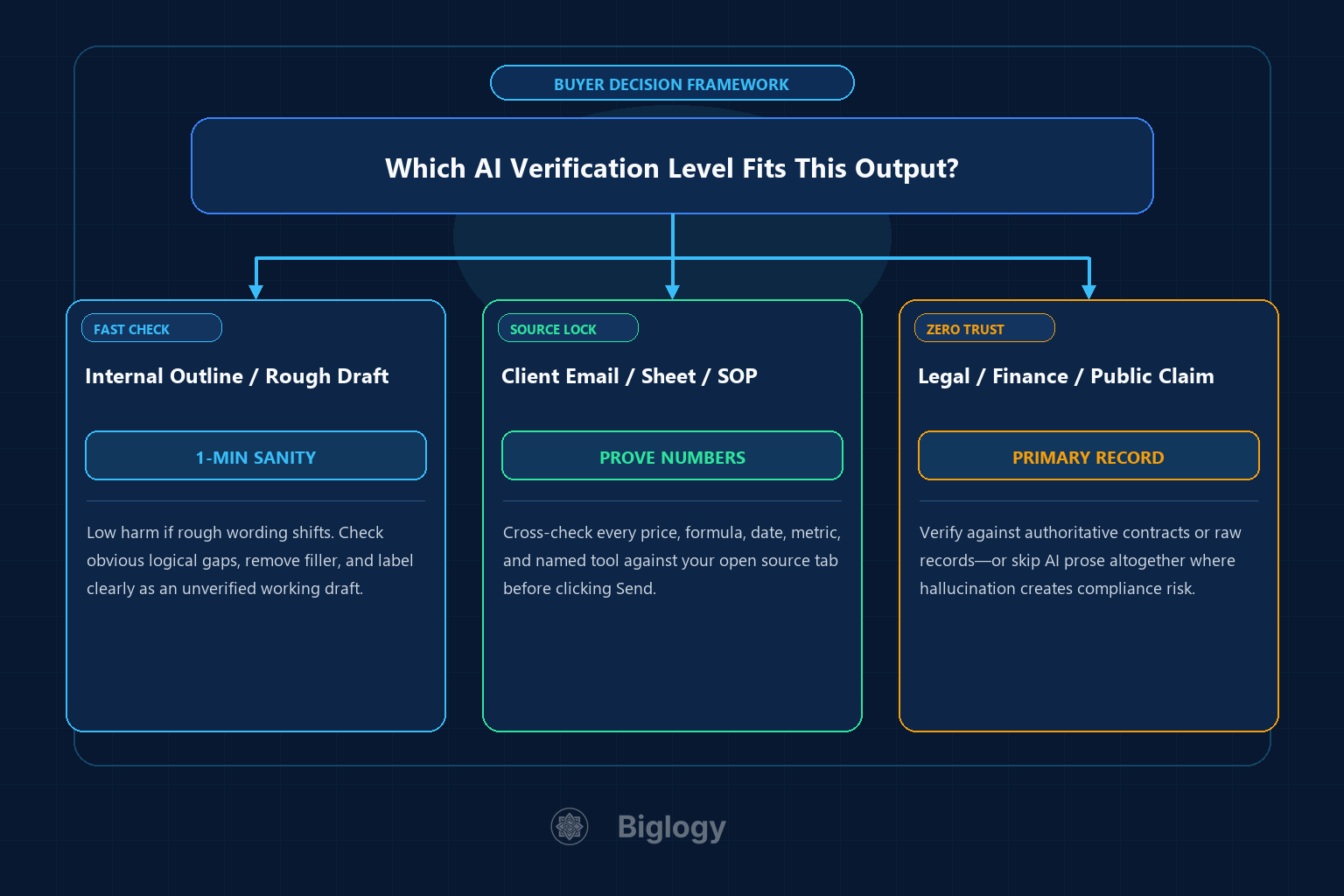
| Tier 1: Low Reversible Risk | Meeting agendas, rough internal outlines, brainstorming options, non-binding Slack recaps | Check logical flow, tone, and obvious missing topics; mark as rough draft if shared | 60–90 seconds |
| Tier 2: Operational Accuracy Required | Client follow-up emails, vendor comparison sheets, SOP checklists, CRM handover notes, Excel formulas | Verify every number, date, formula cell reference, plan limit, and action owner against primary tabs | 3–6 minutes |
| Tier 3: High Harm / Irreversible Action | Contract redlines, invoice approvals, compliance attestations, HR disciplinary notes, public financial claims | Do not trust paraphrased claims; confirm against original signed PDF, ledger, or qualified reviewer | Full primary sign-off (or skip AI) |
Verification Decision Gate: Match Effort to Consequence
When work pressure rises, teams abandon checklists that feel heavy. The visual framework below compresses the decision into a three-branch rule you can keep pinned alongside your team wiki.
Copyable 90-Second AI Output Verification Checklist
Paste this lightweight verification block below any AI-assisted operational draft inside Notion, Google Docs, or your internal SOP before signing off on Tier 2 deliverables.
AI VERIFICATION GATE (TIER 2 WORKPLACE DELIVERABLE)
Document / Task:
Source Material Used (URL, PDF date, Sheet tab):

[ ] 1. NUMBERS & DATES: Confirmed every currency amount, %. seat count, and deadline against source.
[ ] 2. BOUNDARIES & EXCLUSIONS: Checked "not included", caveats, and footnotes—not just headline bullets.
[ ] 3. QUOTES & CLAUSES: Verified no policy rule, SLA, or feature name was inferred or extrapolated.
[ ] 4. SPREADSHEET LOGIC: Tested formula references on 2 real rows (edge cases: zero, blank, negative).
[ ] 5. OWNERSHIP & PII: Removed sensitive customer records if not in an approved workspace (see Biglogy Data Guide).
[ ] 6. EXPLICIT UNKNOWN TAG: Replaced any unconfirmed claim with [VERIFY WITH VENDOR / OWNER] before sending.

Verified By: _____________   Date: ____-__-__
Copyable Prompt Wrapper That Cuts Rewrites in Half
Rather than fixing mixed paragraphs afterward, prepend this constraint block when summarizing vendor docs, client briefs, or internal reports:
Work ONLY from the material I paste below.
1. Separate output into: (A) Direct Facts Cited From Input, (B) Recommendations / Interpretation, and (C) Gaps Requiring Human Check.
2. For every price, limit, metric, or date in (A), include the exact source line or heading name in brackets.
3. If an item is implied rather than explicitly stated, mark it [NOT EXPLICITLY STATED — VERIFY]. Do not fill gaps from general memory.
When Dedicated Tooling Makes Sense vs. When Manual Discipline Wins
Most teams do not need a paid ‘AI fact-checker SaaS’ sitting on top of another AI chat subscription. Adding a second probabilistic model to grade the first model still leaves you exposed when both share identical blind spots or stale training cutoffs. Dedicated tooling only earns its seat cost when you need deterministic retrieval directly against your own indexed policy vault, ERP database, or version-controlled knowledge base with source links on every citation.
If your bottleneck is vendor comparison accuracy, start by checking how Biglogy documents product evaluations in our software evaluation methodology and aligning purchase decisions with our Benefit, Evidence, Transparency, and Justice publishing charter. When tools are small-team productivity aids rather than primary systems of record, keeping verification human, fast, and token-focused almost always wins on total cost and speed.
Seven-Day Verification Check: Confirm Your Checklist Works
- Days 1–2: Tag your next five AI-assisted drafts using the Tier 1 / Tier 2 / Tier 3 table without changing your usual prompts.
- Days 3–4: Add the generation wrapper prompt on Tier 2 drafts and measure whether total review + edit time drops below doing the task from scratch.
- Days 5–7: Track how many factual catches happened inside the 4-token audit (numbers, nouns, comparators, absolutes). If AI drafts take more minutes to audit than writing cleanly from your source notes, drop AI for that recurring task.
Frequently Asked Questions
Should I ask a second AI chatbot to verify the first AI’s answer?
Not as your final proof step. While a second prompt can catch internal contradictions or tone slips, two language models frequently invent similar plausible answers when neither is anchored to your live source file. Always check Tier 2 numbers and limits against primary documentation, live checkout pages, or your own spreadsheet.
How do I quickly verify AI-written Excel or Google Sheets formulas?
Never rely on a single happy-path test row. Test every generated formula on three deliberate cases: a normal row, a blank or zero-value cell, and a boundary mismatch (for example, text instead of a number). Also verify absolute versus relative references ($A$2 vs A2) before dragging across hundreds of rows.
Does uploading a PDF eliminate AI errors?
No. File upload reduces open-web fabrication, but chunking limits and table-parsing bugs still cause models to misread multi-column pricing tables, skip footnotes, or merge rows across adjacent plans. Still verify numeric tables column by column.
What is the fastest check before sending an AI-drafted client email?
Verify four items in 30 seconds: client name/company spelling, exact committed dates or deliverables, any quoted price or discount rule, and whether any promise was accidentally strengthened from ‘we can explore’ to ‘we guarantee.’
When should we ban AI drafting completely for a workplace task?
Whenever error reversal is impossible or reputationally severe, or when input records are too fragmented for clean citation—such as binding legal notices, individualized HR evaluations, audited financial statements, or regulated privacy notices.
Editorial transparency: This guide is non-commercial educational methodology with zero affiliate links or sponsored placements. Read Biglogy’s full principles in our Content Philosophy.


Leave a Reply
Want to join the discussion?Feel free to contribute!