

Why Your Automation Runs Without Errors Yet Still Breaks Leads
Quick answer: A green ‘Success’ log in an automation platform only means the runtime executed its steps without an unhandled HTTP 4xx/5xx crash—it does not prove a customer actually landed in your CRM or received a follow-up email. Silent lead loss happens most often when (1) a filter evaluates false on malformed fields and exits cleanly, (2) a CRM returns HTTP 200 with an ignored-duplicate or validation skip warning, or (3) two async steps collide before an ID exists.
The most expensive automation failure is not a red error alert—it is a workflow that returns Success 200 every morning while quietly dropping 15% of inbound buyers.
The Symptom: Clean Logs, Empty Pipeline Rows, and Slow Discovery
Unlike hard crashes that trigger outage alerts, silent failures blend into normal business noise for weeks. A prospect submits your quote form, receives no reply, or a sales rep notices that last week’s campaign shows 42 form completions while the CRM created only 35 contacts. You open Make, Zapier, or your webhook logs expecting a wall of red triangles, and instead see row after row marked green.
By the time anyone reconciles analytics against inbox notifications, leads have gone cold. Before rebuilding your entire stack or switching platforms, map the gap inside your existing intake pipeline using our structured lead capture workflow guide (form to Sheet or CRM to follow-up).
Root Cause Taxonomy: Five Ways a Passing Workflow Loses Real Data
| Silent Failure Pattern | Why Logs Show Green / Success | Typical Symptom in Your CRM or Inbox |
|---|---|---|
| 1. Upstream Filter Short-Circuit | Condition checked email contains @ or mapped an updated form field key that arrived blank; path stopped cleanly as designed. | Form entries with non-standard field keys or trailing spaces trigger the scenario but exit before Step 2. |
| 2. Soft API 200 Rejections | Destination app accepted the HTTP request and returned JSON with status: skipped (duplicate policy, missing required enum, invalid phone format). | Records from specific regions or missing optional tags vanish while successful records next to them look normal. |
| 3. Partial Field Overwrite / Blank Mapping | Update step mapped a nullable trigger field onto an existing CRM property, wiping earlier lifecycle notes or lead source tags without throwing an error. | Contacts exist, but UTM parameters, company sizes, or assignment owners keep turning empty. |
| 4. Multi-Step Race Condition | Enrichment or email branch ran in parallel before the CRM upsert step finished returning a new record ID, falling back on empty variables. | Notification emails arrive with missing contact links or empty personalized merge fields. |
| 5. Stale Webhook Secret / Form Revision Mismatch | Someone cloned a landing page, renamed a form field (`work_email` -> `email`), or switched embed forms; old webhook stays live receiving zero traffic. | Zero errors logged simply because new submissions hit an unconnected endpoint. |
Diagnostic Gate: Where Did the Lead Actually Drop?
Follow the three diagnostic branches below from intake toward destination instead of guessing which tool is at fault.
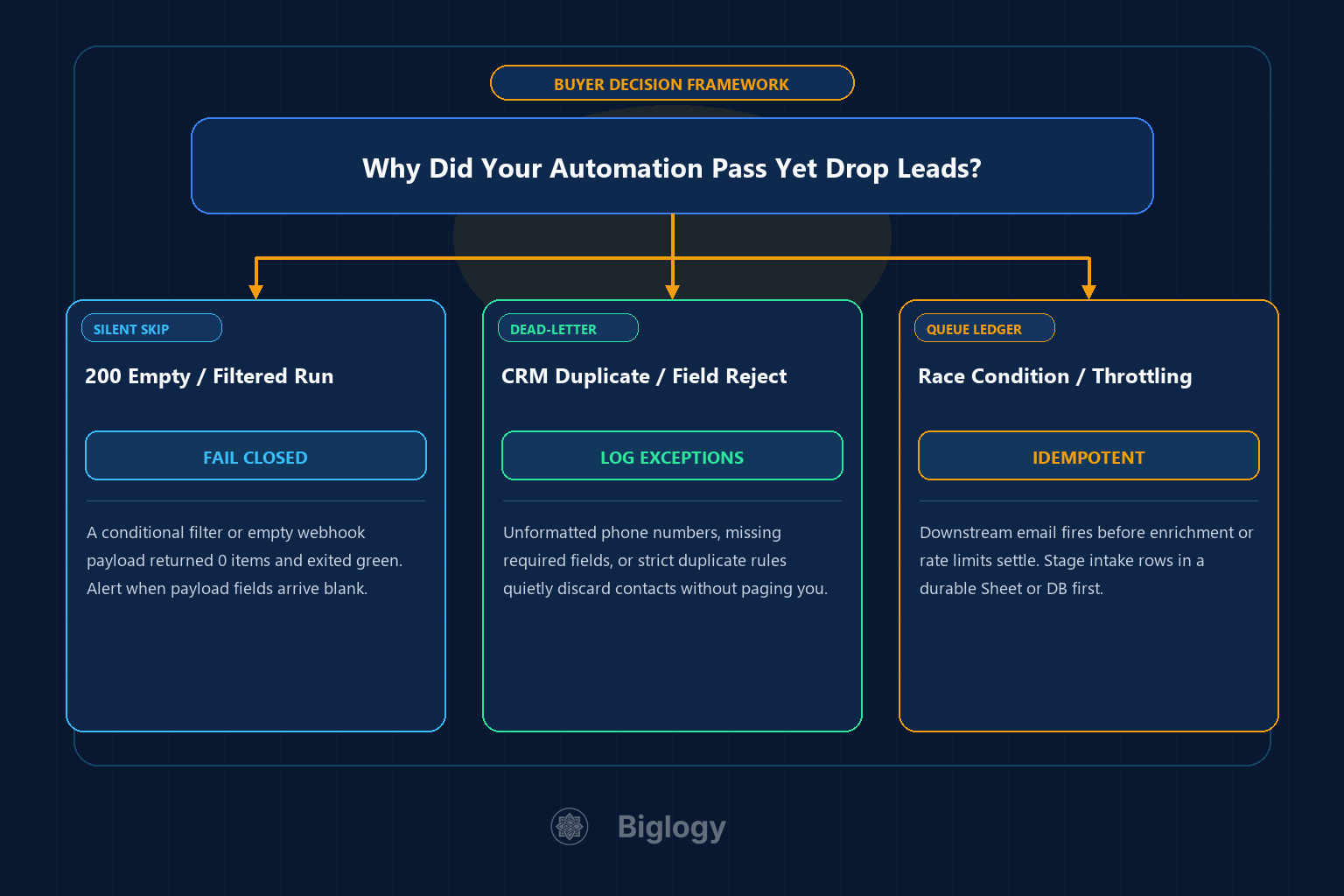
No-Tool First Step: Build a Fail-Closed Diagnostic Without Buying Monitoring SaaS
You do not need an enterprise observability suite to plug silent lead leaks. You can implement all three safeguards today inside Google Sheets, your existing form tool, and your current automation builder.
- Separate Capture from Processing (Step 1 = Append Raw Ledger Row): Make the very first step after every webhook/form trigger append an immutable raw row to a dedicated intake log tab (timestamp, email, form ID, raw JSON payload, processing status =
PENDING) BEFORE any filter, enrichment, or CRM call runs. Even if step four skips, drops, or drops an exception later, the raw lead is already saved safely. - Fail Closed on Missing Required Fields: Add an explicit fallback router branch for cases where
email,name, orsourceis blank/malformed, sending a Slack or email alert with the raw submission payload rather than silently filtering the execution out. - Update the Intake Ledger Status at the End Only: Make the final step mark the intake row
SYNCED_CRM_ID=.... Once per day—or via a scheduled filter—any row still stuck atPENDINGafter 15 minutes immediately exposes a silent drop.
Copyable Intake Ledger Schema & Reconciliation Check
Create a single seven-column tab named lead_intake_ledger in Google Sheets or Airtable and wire every workflow through it before CRM branching:
LEAD_INTAKE_LEDGER COLUMNS (APPEND AT STEP 1 — BEFORE ANY FILTER)
-------------------------------------------------------------------
1. received_utc       | ISO timestamp from trigger payload
2. form_or_source_id  | Exact form ID / landing page URL slug
3. submission_uuid    | Native form submission ID or hash(email + timestamp_min)
4. lead_email         | Lowercased, trimmed raw email string
5. raw_payload_json   | Full JSON string of incoming payload (recovery insurance)
6. sync_status        | Starts as PENDING -> updated to SYNCED or FAILED_VALIDATION
7. crm_record_id      | Written ONLY in final step after CRM returns confirmed non-empty ID

DAILY 2-MINUTE AUDIT FORMULA (SHEET CHECK):
Count unresolved silent drops older than 15 minutes:
=COUNTIFS(F2:F, "PENDING", A2:A, "<"&(NOW()-TIME(0,15,0)))
Error Handling Differences Across Major Workflow Tools
Once your raw intake ledger protects lead capture, inspect how your orchestration layer handles partial HTTP rejections, dead-letter retries, and multi-branch execution. Platform architecture affects debugging time heavily: if you are deciding whether your current workflow ceiling stems from tool design or pricing constraints, compare our Zapier vs Make vs n8n real cost analysis for 1,000 leads alongside our dedicated Zapier review covering task limits and error recovery and Make review covering routers, error handlers, and credit mechanics.
In general: visual canvas tools that let you attach explicit error-handler directives (resume, commit, rollback, or fallback route) directly onto fragile CRM modules make exception isolation simpler than linear triggers—while if you send fewer than a few hundred simple form leads per month, a direct Google Sheets no-code capture and follow-up flow often removes multiple fragile hops altogether.
Verification Check: Prove Every Branch Fails Loudly
Never assume error alerts work until you deliberately break the workflow in a controlled test. Run these three synthetic checks after wiring your ledger:
- Test A (Blank key test): Submit your form or webhook with a missing company name or dummy malformed phone number; confirm a
PENDINGrow appears and an alert fires if the CRM rejects formatting. - Test B (Duplicate lead test): Submit the same email address twice within five minutes; verify whether your CRM overwrites, merges, skips silently, or logs the returned duplicate ID properly.
- Test C (Volume vs. CRM reconciliation): Seven days after deployment, compare total raw submissions in your form builder against total
SYNCEDrows in your intake ledger and net new/updated CRM contacts. All three numbers must reconcile cleanly.
Frequently Asked Questions
Why did my CRM reject a lead even though the automation tool marked the step green?
Many REST endpoints return an HTTP 200 response containing an internal validation object or deduplication notice when a record is skipped rather than returning a 400 or 422 HTTP error. Unless your workflow checks that a real record ID came back in the response JSON, it logs green.
Does adding a Google Sheet ledger slow down instant lead follow-up?
Logging one row typically adds under 1–2 seconds—negligible for email or Slack handoff—while preventing permanent revenue loss when downstream APIs throttle or reject a payload.
Should I pause live automations while testing field changes?
Wait until you clone the scenario or guard production filters cleanly. Editing form field slugs in place (such as renaming Email to Work Email) is one of the fastest ways to cause silent unmapped null submissions on live traffic.
Can deduplication rules drop legitimate repeat inquiries from existing buyers?
Yes. If your integration checks ‘create contact only, skip existing email,’ returning customers asking for a second quote may update zero opportunity pipelines or notifications. Separate contact upsert from deal/ticket creation.
When should we migrate from fragile multi-tool webhooks to simpler native integrations?
Whenever a single native form-to-CRM integration already covers 90% of your routing rules natively. Fewer third-party webhook hops directly reduces schema drift.
Editorial transparency: This troubleshooting guide is reader-first educational documentation. For full details on how Biglogy evaluates automation platforms and maintains editorial independence, read our Software Evaluation Methodology and Publishing Charter.


Leave a Reply
Want to join the discussion?Feel free to contribute!