

What Not to Automate: A Simple Decision Checklist Before Buying
Quick decision rule: Do not buy or build full automation if a workflow has more than a 20% exception rate, irreversible error cost (wrong billing, wrong customer legal notice, leaked access), or fewer than 15–20 monthly repetitions. Simplifying the checklist first—or automating only the prep step with a human click before final delivery—saves far more hours than wiring fragile bots around broken habits.
Automating an unclear manual process does not eliminate confusion; it executes confusion at scale and charges you per task.
The Pre-Purchase Symptom: Buying Tools to Rescue Chaotic Workflows
Teams rarely regret skipping an unnecessary SaaS tool; they frequently regret paying for three months of builders, webhooks, and maintenance to automate an edge-case-heavy task that a single clear SOP would have solved in 15 minutes a week. While Biglogy’s analysis of whether marketing automation is too much for small businesses examines campaign overload specifically, the broader trap hits operations teams across onboarding, invoicing, support triage, and internal approvals.
Before comparing automation pricing tiers or designing another complex agent workflow, run the process itself through five hard exclusion gates.
Five Red-Flag Patterns That Belong Off Your Automation Roadmap
| Exclusion Gate | Threshold to Stop Full Automation | What Goes Wrong When Automated Anyway |
|---|---|---|
| 1. Exception Rate & Edge-Case Density | >20% of runs need custom judgment, manual overrides, or off-template clarifications. | Teams spend more hours patching conditional branches and inspecting failed runs than doing the original task. |
| 2. Cost of One Silent or Wrong Execution | Mis-sent invoice, wrongful account suspension, erroneous refund, legal/compliance misstatement. | One automated mistake erases six months of labor savings and burns client trust immediately. |
| 3. Unstandardized / Dirty Inputs | Clients submit scanned PDFs, free-text Slack voice notes, inconsistent spreadsheet headers. | Field parsers break silently every time a sender tweaks formatting or includes unexpected notes. |
| 4. High Empathy or Relationship Stakes | Angry billing escalations, contract negotiations, renewal retention, sensitive HR/team feedback. | Templated auto-replies feel dismissive at the exact moment human attention retains high-value accounts. |
| 5. Low Break-Even Volume | Occurs <10–15 times per month or saves under ~2 hours/month total. | Setup (6–12 hours) plus ongoing API/schema updates takes 6–12 months just to break even on time. |
Three-Path Decision Tree: Automate, Assist, or Keep Manual
Not every task is all-or-nothing. Use this visual split to place each recurring task into full automation, human-in-the-loop assistance, or explicit manual ownership.
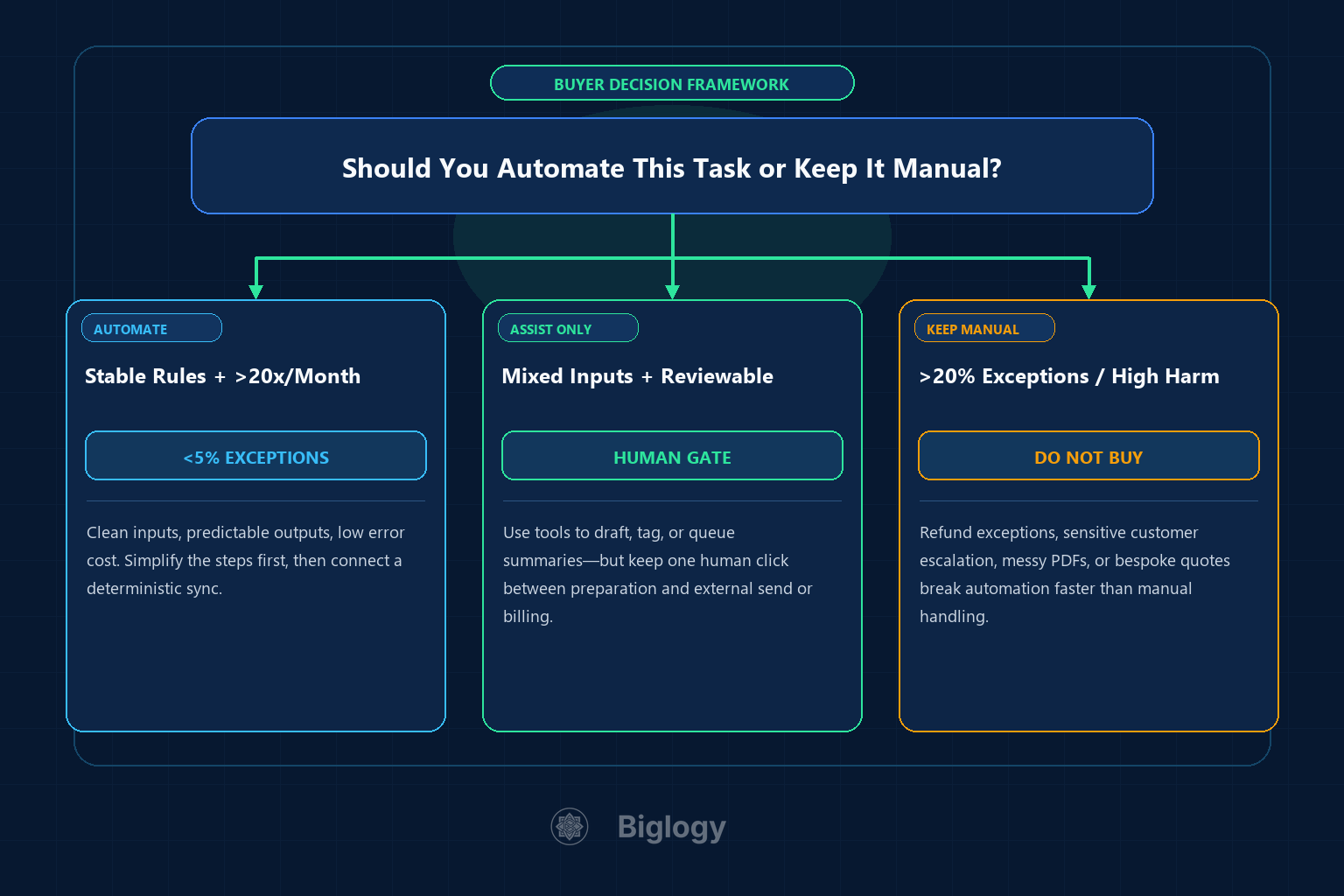
No-Tool First Step: The Process-Before-Software Refactor
Before evaluating software integrations or planning your small business software stack, apply a two-week manual refactor first. If the process stays awkward on paper, software will make it worse:
- Standardize the intake first: Replace open-ended email requests with one structured form containing required dropdown fields. Often, a single structured form eliminates 60% of back-and-forth without a single webhook.
- Cut unnecessary steps instead of automating them: Ask whether the weekly report or status sync notification actually drives any decision. Removing one unneeded report saves 100% of setup and maintenance cost.
- Keep a ‘Human Draft + One-Click Send’ middle lane: Let software assemble data, apply tags, or create a draft invoice—while a human clicks Final Send after a 20-second glance.
Copyable Break-Even & Risk Scorecard
Score any candidate workflow out of 100 using this compact plain-text sheet before opening a new paid automation account:
PRE-AUTOMATION READINESS SCORECARD
Workflow Name:
Monthly Runs: ____   Minutes Per Manual Run: ____   Est. Setup + Debug Hours: ____

PASS ONLY IF ALL 4 MANDATORY GATES ARE 'NO':
[ ] Does failure directly expose customer money, legal status, or private PII? (YES = STOP / HUMAN GATE ONLY)
[ ] Do >20% of runs require manual overrides, calls, or unstructured exceptions? (YES = STANDARDIZE FIRST)
[ ] Does source schema / form formatting change more than once a quarter? (YES = FIX INTAKE FIRST)
[ ] Is monthly labor saved < 2 hours while setup exceeds 6 hours? (YES = KEEP MANUAL / USE TEMPLATE)

DECISION RESULT:
- All 4 NO + High Repetition (>20/mo)  -> SAFE CANDIDATE FOR AUTOMATION
- 1+ YES on Risk, but high data prep   -> HUMAN-IN-THE-LOOP DRAFTING ONLY
- 2+ YES or tiny monthly volume        -> DO NOT BUY TOOLS; USE SAVED CHECKLIST
Where Automation Actually Pays Off (And When to Compare Platforms)
When a workflow passes all four gates—repetitive intake logging, predictable calendar/CRM handoffs, standardized billing receipts, or structured file backups—good automation saves real weekly focus. At that stage, evaluate tools conservatively on total operational cost rather than flashy AI demos: compare real execution economics in Biglogy’s Small-Business Workflow Automation Guide and our 1,000-lead Zapier vs Make vs n8n cost breakdown. Notice how Biglogy’s own Content Philosophy treats saying ‘do not buy yet’ as a first-class successful outcome.
Seven-Day Post-Decision Verification
After placing three tasks onto the ‘keep manual’ list and picking at most one candidate to streamline:
- Track actual weekly minutes spent using your simplified manual templates/checklists for 14 days.
- Record every real exception that showed up; if exceptions stay under 5% for two straight weeks, the process has matured enough for clean automation later.
Frequently Asked Questions
Isn’t ‘automate everything first’ faster when scaling a lean startup?
Usually the opposite early on. When your offer, pricing, and onboarding steps are still evolving monthly, automating early locks half-tested workflows into brittle integrations you have to rebuild three times.
What is a safe alternative to keeping a repetitive task 100% manual?
Batching + templates + human-in-the-loop staging. Gathering facts or creating a draft message automatically while keeping final approval manual cuts 70–80% of typing time with almost zero silent catastrophic risk.
How many times per month must a task happen before automation makes sense?
There is no single magic number, because setup complexity varies—but as a pragmatic rule, tasks taking 5 minutes once a week (20 minutes/month) rarely repay custom API integrations within a year once debugging and token updates are counted.
Can AI agents safely absorb high exception rates automatically?
Rarely on external customer actions without strict confidence thresholds and human escalation queues. Unbounded AI agents turn occasional human misunderstandings into confident automated wrong actions.
Should customer onboarding be automated or manual?
Split it cleanly: automate invoice confirmation, workspace link delivery, and intake form setup (deterministic steps), while keeping custom scope confirmation, kickoff expectation alignment, and escalation calls human.
Editorial transparency: This checklist is an independent non-commercial buyer framework with zero affiliate links. Learn how we audit software claims in our Software Evaluation Methodology and Publishing Charter.
Related posts:
 Comprehensive Glossary of Project Management Terminology: Understanding Key Concepts and Techniques
 Choosing Tools in the Creator Economy: Start Simple or Go with an All-in-One Platform?
 What Is Human-Centered SEO? Focusing on the Problem, Not the Keyword
 Is Marketing Automation Too Much for Small Businesses?


Trackbacks & Pingbacks
[…] explored in our decision guide on what not to automate, true organizational resilience comes from knowing which human touchpoints must remain deliberately […]
Leave a Reply
Want to join the discussion?Feel free to contribute!