

Kit Review for Creators: 2026 Email Platform Breakdown, Pricing, and Automation
Editorial disclosure: This review evaluates Kit using its current public product, pricing, and affiliate-program documentation. We did not run a controlled deliverability test or claim hands-on results that were not documented. The links in this draft are ordinary source links, not approved affiliate links. If an affiliate link is added later, it must be clearly disclosed and must not change the verdict.
Pricing checked: November 11, 2026. Kit charges by subscriber count, billing cycle, and plan, and it may display temporary promotions. Verify the total shown for your account before paying.
Kit—formerly known as ConvertKit—is an email platform built around the way newsletter writers, educators, coaches, and digital-product sellers work. Businesses evaluating traditional marketing platforms can compare this approach in our GetResponse vs Mailchimp comparison, while course creators can explore all-in-one platforms like systeme.io vs Kajabi. Its strongest idea is simple: keep one subscriber record, organize people with tags and segments, and connect forms, broadcasts, automated sequences, recommendations, and sales without building a traditional CRM.
That focus is also the boundary of the product. Kit is a strong choice when email is the center of a creator business. It is less convincing when a company needs a sales CRM with deal stages, highly customized account records, or enterprise-style branching across many departments and channels.
Kit review: the short verdict
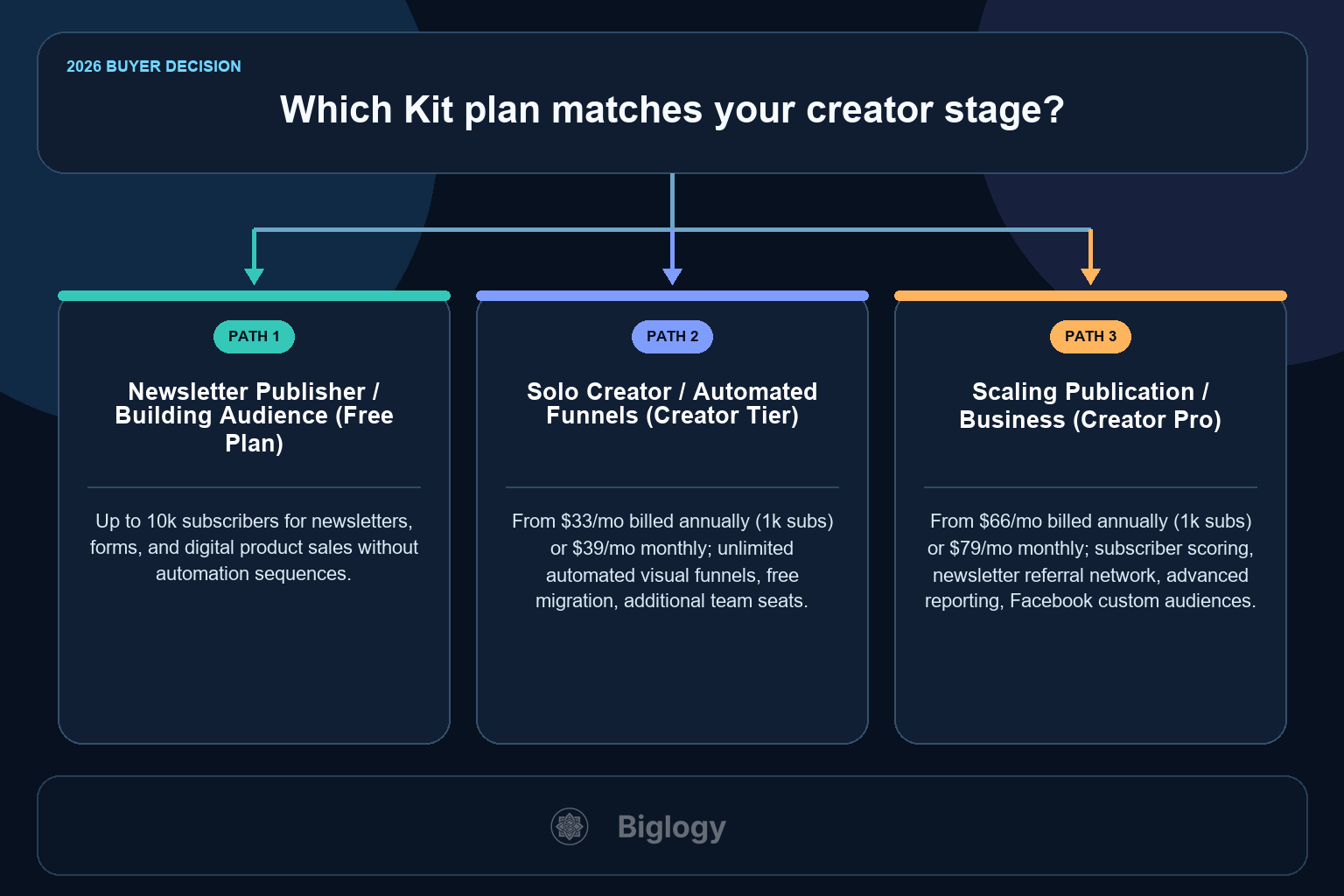
Kit is best for creators who want to publish newsletters, grow an audience, automate welcome or launch sequences, and sell digital products from one email-centered system. The Free plan is unusually capable for publishing and list building, while the Creator plan is the practical starting point for anyone who needs automated sequences. Pro makes more sense for a larger operation that can use engagement scoring, deeper reporting, collaboration, and a reader referral program.
The main cautions are cost growth as the list expands, the absence of sequences and Visual Automations on Free, a 3.5% + $0.30 fee on Kit Commerce transactions, and a creator-first automation model that is not a substitute for a full sales CRM.
| Decision factor | Our assessment |
|---|---|
| Best for | Newsletter-led creator businesses, educators, authors, coaches, podcasters, and digital-product sellers |
| Strongest feature | One audience organized with tags and segments, connected to sequences and visual automations |
| Best free use | Broadcast newsletters, landing pages, forms, recommendations, and early audience building |
| Main paid-plan reason | Automated email sequences and Visual Automations |
| Main limitation | Costs rise with subscriber count; complex CRM and enterprise workflows may need other tools |
| Commerce fit | Convenient for simple digital products, subscriptions, and paid newsletters, but transaction fees matter |
| Verdict | Recommended for email-first creators; compare alternatives if CRM depth is the primary requirement |
How Kit organizes subscribers
Kit uses one audience with tags and segments instead of forcing creators to maintain several disconnected lists. A tag can record an interest, signup source, purchase, or action. A segment can combine conditions to create a usable group—for example, people tagged “course interest” who have not purchased.
This architecture has two practical advantages. First, the same person can belong to several relevant groups without becoming several separate subscriber records. Kit explicitly says its system avoids charging twice for the same subscriber. Second, personalization can follow what a person has done instead of which list they entered first.
That structure is particularly helpful when a creator has several lead magnets or products. A reader might join through a writing checklist, later click an editing-course link, and eventually buy a workshop. Tags and custom fields can preserve those signals on one profile.
It still requires planning. A careless tag system becomes cluttered quickly. Before importing an audience, define a small naming convention for acquisition source, interests, customer status, and consent. Tags should describe durable facts; temporary campaign membership is often better handled with a segment.
Automations and sequences
Kit separates automated email sequences from the visual logic that moves subscribers through a workflow. A sequence is a timed series such as a welcome course, product launch, or onboarding flow. Visual Automations connect entry points and events—signups, purchases, clicks, tags, or dates—to actions and paths.
This is the clearest reason to upgrade from Free. Kit’s current feature comparison places email sequences and Visual Automations on Creator and Pro, not Free. A free account can send broadcasts, collect subscribers, use tags and segments, and sell products, but it cannot run the classic automated welcome sequence that many creators expect from an email marketing tool.
For a creator business, the model is approachable: a form can add a tag, start a welcome sequence, branch when a subscriber buys, and prevent customers from receiving more sales emails for the same product. Kit also supports conditional content using Liquid-based rules and connects to creator tools through its app ecosystem.
The limitation is scope. Kit can build meaningful email journeys, but teams that need deal pipelines, account hierarchies, extensive lead scoring models, or complicated multi-channel orchestration should not assume that “visual automation” means full enterprise CRM automation.
Creator Network, recommendations, forms, and landing pages
Kit’s Recommendations feature lets creators recommend one another in signup flows and emails. It is available across the plans, including Free. This can give a newsletter an additional discovery channel, but the existence of a recommendation network does not guarantee audience growth. Results depend on fit, placement, the quality of the participating newsletters, and how compelling the original signup offer is.
Paid Recommendations are different. They allow creators to pay for qualified subscriber referrals or earn money by recommending other newsletters, and Kit currently places that feature on Creator and Pro. Kit’s pricing table also lists a 23.5% platform fee on Paid Recommendations earnings, which should be included in any acquisition or revenue calculation.
Pro includes a newsletter referral system powered through SparkLoop. That is a reader-rewards mechanism: subscribers receive referral links and can earn rewards for bringing in new readers. Do not confuse it with the general Creator Network, which is available on Free, or Paid Recommendations, which uses a paid acquisition and payout model.
The list-building foundation is solid even without those network effects. Kit includes unlimited landing pages and forms, templates, custom-domain support for landing pages, opt-in incentive delivery, and a newsletter site. That makes the Free plan useful for validating a newsletter idea before paying for automation.
Kit pricing in 2026
At 1,000 subscribers, Kit’s live annual-billing display on November 11, 2026 showed the following:
| Plan | Price shown for 1,000 subscribers | What changes the decision |
|---|---|---|
| Free | $0; up to 10,000 subscribers | Broadcasts, forms, landing pages, tags, recommendations, and commerce are included; sequences and Visual Automations are not |
| Creator | $33/month, billed as $390 yearly | Adds unlimited sequences, Visual Automations, integrations, RSS campaigns, removal of Kit branding, and support |
| Pro | $66/month standard annual-billing rate | Adds subscriber signals, engagement scoring and analytics, unlimited users, referral program, deliverability reporting, and priority support |
The page also displayed a temporary first-year Pro promotion. Treat that as a time-limited offer, not the permanent price. Monthly billing will differ from annual billing, and the total increases with the number of active subscribers.
The Free plan’s 10,000-subscriber ceiling sounds generous, but the real plan boundary is automation rather than audience size. A writer with 3,000 subscribers who only sends a weekly edition may remain comfortable on Free. A creator with 300 subscribers who needs an automated five-day course will need Creator or Pro.
Before choosing a plan, model the next 12 months rather than today’s list size alone. Check the price at your expected subscriber count, decide whether annual billing is acceptable, and separate permanent plan value from a first-year promotion. Our guide to verifying SaaS pricing and plan limits explains a repeatable way to make that comparison.
ConvertKit versus Kit: is it the same platform?
Yes. ConvertKit announced the move to the Kit brand in 2024. Older articles, tutorials, integrations, and screenshots may still use the ConvertKit name. They refer to the predecessor brand of the continuing service, not a separate competing product.
That does not make old feature or price claims reliable. Rebranding and product continuity answer the identity question; they do not freeze plan limits. For example, older material may say that a paid plan is required for custom domains, while Kit’s current comparison lists a customizable domain for landing pages on Free. Use older ConvertKit tutorials for general concepts, then verify every plan-specific instruction against current Kit documentation.
Commerce, paid newsletters, and transaction fees
Kit Commerce can sell ebooks, courses, coaching, subscriptions, tips, and paid newsletters. Buyers can be tagged at checkout, and purchases can feed automations on the paid plans. For a solo creator, this reduces the number of systems needed to launch a simple offer.
Kit currently lists a fee of 3.5% + $0.30 for built-in digital-product and subscription transactions on Free, Creator, and Pro. Kit describes that amount as inclusive of card processing. The fee is easy to understand, but it becomes material at scale.
For example, 100 sales of a $50 product produce $5,000 in gross revenue. At 3.5% + $0.30 per transaction, the stated transaction cost would be $205 before refunds, taxes, or other business expenses. That calculation is not a quote and does not include every possible cost; it simply shows why sellers should model transaction fees rather than treating integrated checkout as free.
An external checkout may avoid Kit’s platform fee, but it introduces a separate processor, integration, delivery workflow, and its own costs. Compare the complete workflow—not just one percentage. If you separate checkout from email delivery, map what happens after payment, how the buyer is tagged, where the product is delivered, and how failed payments are handled. See our digital product checkout and email delivery guide for that workflow.
Deliverability: useful controls, not a guaranteed outcome
Kit supports authentication and reputation controls such as SPF and DKIM with a verified domain, one-click unsubscribe handling, and deliverability features across all plans. Pro adds deliverability reporting and a custom tracking domain.
Those features are valuable, but no responsible review should promise an inbox-placement rate based on a feature page. Deliverability depends on domain reputation, consent quality, complaint rates, engagement, content, sending consistency, and recipient providers. Before migrating, authenticate the sending domain, suppress invalid or unengaged contacts, and test a gradual transition. A platform can provide the controls; the sender still owns list hygiene and permission.
Two creator scenarios
Scenario A: a solo writer moving from Substack or Medium
Suppose a writer publishes one essay each week and wants a branded landing page, an owned subscriber export, and a simple newsletter archive. Kit Free can cover that early stage: it provides forms, landing pages, a newsletter site, broadcasts, tagging, and Recommendations.
The upgrade decision arrives when the writer wants every new subscriber to receive a timed onboarding series or wants an evergreen email course to run automatically. Creator is the sensible step because sequences and Visual Automations are the missing capabilities—not because the list crossed an arbitrary small threshold.
The writer should stay on Free until automation saves enough time or produces enough measurable value to justify the annual plan. A polished welcome broadcast sent manually is better than paying for an automation that has not been planned.
Scenario B: a course and media publisher
Now consider a publisher with a newsletter, several courses, sponsorship activity, and collaborators. Creator can handle product-interest tags, launch sequences, purchase-based exits, and integrations. Pro becomes relevant when the team can use unlimited user seats, engagement scoring, deeper reporting, subscriber signals, a reader referral program, or deliverability reporting.
The key test is operational value. Pro is not automatically better because the business is “professional.” It is better only when those features change a decision or remove paid work elsewhere. If the team will not act on scoring, referral rewards, or deeper analytics, Creator may remain the better value.
For a landing-page-to-checkout architecture, document the handoff between acquisition, payment, and fulfillment before selecting tools. Our landing page, checkout, and email flow guide provides a practical map.
Kit affiliate program and our disclosure
Kit’s public affiliate page currently states that approved affiliates receive 50% commission on each new customer’s first 12 months. Affiliates who refer 10 paying customers in a year can also receive an additional 10% recurring commission while those customers remain with Kit. The stated tracking window is 90 days.
Those are program terms for publishers, not a customer discount and not evidence that Kit is the best platform. Approval is not guaranteed, and terms can change. This draft does not contain an approved Kit affiliate link. If Biglogy later inserts one, it should be marked as sponsored and accompanied by a clear disclosure near the recommendation.
Frequently asked questions
Is Kit the same as ConvertKit?
Yes. ConvertKit announced its rebrand to Kit in 2024. Older ConvertKit tutorials may still be useful, but verify plan names, limits, prices, and interface steps because the service has continued to change.
Can I use Kit for free?
Yes. Kit’s Free plan currently supports up to 10,000 subscribers and includes broadcasts, forms, landing pages, tagging and segmentation, Recommendations, and commerce. Automated email sequences and Visual Automations require Creator or Pro.
Does Kit charge for duplicate subscribers?
Kit describes a one-list model in which a unique active person is counted once and can be organized with several tags and segments. Review your import and account billing screen before migration, especially if you are consolidating lists from another platform.
Can Kit sell courses and ebooks?
Yes. Kit Commerce supports digital products, coaching, subscriptions, and paid newsletters, with automatic delivery and buyer tagging. The listed transaction fee is 3.5% + $0.30. A complex course business may still need a learning platform, tax tooling, or a separate checkout.
Is Kit good for a large company?
It can support a sizable creator business, especially on Pro, but size is not the only issue. Kit remains email- and creator-centered. A company that needs account-based sales, deal stages, advanced permissions, or extensive cross-channel orchestration should compare a full CRM or marketing automation suite.
Final decision framework
Choose Kit if most of these statements are true:
- Email is the center of your audience and revenue model.
- You prefer one subscriber record organized by tags and segments.
- You need creator-friendly forms, landing pages, newsletters, recommendations, and simple commerce.
- You can describe the sequences and automations you will actually build.
- You accept subscriber-based pricing and have modeled the next list-size tier.
Compare other platforms before committing if most of these are true:
- Your primary need is a sales CRM rather than a newsletter system.
- You require complex enterprise workflows, account hierarchies, or multi-channel orchestration.
- Built-in commerce fees would materially reduce margins.
- You want advanced automation but cannot justify a paid plan.
- You are choosing based on a temporary promotion rather than durable feature value.
Before purchasing, complete this checklist:
- Price your expected subscriber count under both monthly and annual billing.
- Write down the exact automation you need; do not pay for Pro by default.
- Confirm how consent, tags, custom fields, and unsubscribes will migrate.
- Compare Kit Commerce fees with the total cost of an external checkout and delivery stack.
- Authenticate your sending domain and plan a gradual migration.
- Test forms, purchase tags, sequences, suppression rules, and unsubscribe behavior with internal addresses.
- Recheck current plan limits and affiliate disclosures immediately before publication or purchase.
For an email-first creator, Kit’s combination of audience organization, publishing, automation, recommendations, and commerce is coherent and practical. The Free plan is strong for starting; Creator is the real automation tier; Pro is justified by a specific operational need, not prestige. That makes Kit easy to recommend to the right creator—and equally easy to rule out when the real requirement is a full CRM.
Sources checked
- Kit pricing and plan comparison
- Kit feature directory
- Kit affiliate program
- Kit rebrand announcement archive
Related posts:
 GetResponse vs Mailchimp for Creators: 2026 Email Automation and Pricing Comparison
 systeme.io Review for Digital Product Sellers: 2026 Funnels, Email, and Course Hosting Reality
 Thinkific vs LearnWorlds vs Podia: 2026 3-Way Online Course Platform Comparison
 systeme.io vs Kajabi for Course Creators: 2026 Platform and Pricing Comparison

Trackbacks & Pingbacks
[…] point, migrating onto a dedicated ESP evaluated in our GetResponse vs Mailchimp comparison, Kit review, and GetResponse review becomes safer and […]
[…] alternative approaches to creator workflows, read our in-depth Kit review for pure newsletter and creator network monetization, or our systeme.io review if you need an […]
[…] Kajabi comparison, and those pairing their courses with dedicated creator email tools can read our Kit review for creators. Thinkific is the strongest general-purpose choice for a structured course business. LearnWorlds is […]
Leave a Reply
Want to join the discussion?Feel free to contribute!